
Pricing Rules
Manage storefront discount rules, guardrails, and the way partner storefront offers behave across the program.
Before you start
- Decide how storefront discounts should work before partners begin promoting them.
Where to find it
Merchant sidebar → Settings → Pricing Rules
Steps
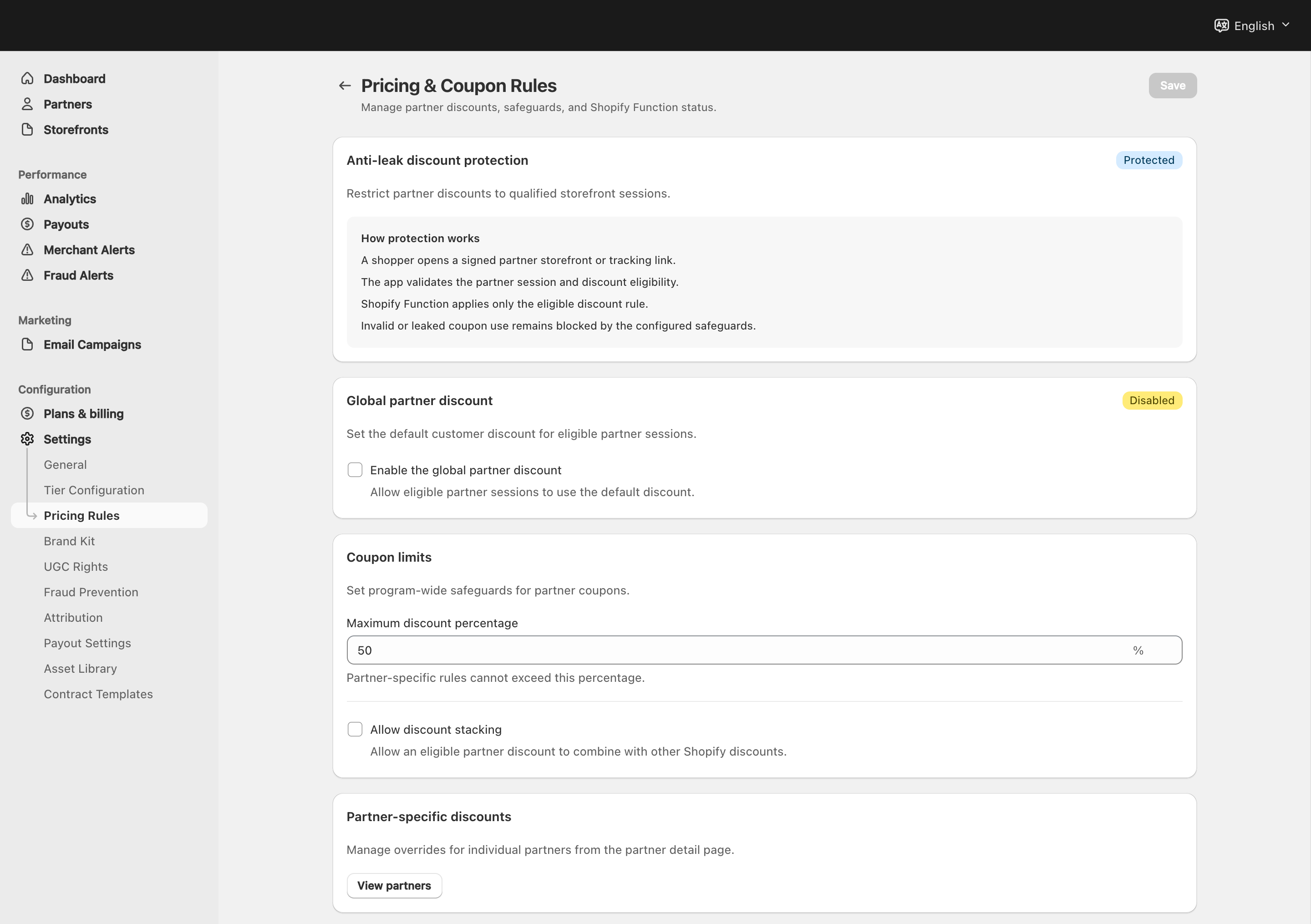
View full-size image: Pricing and coupon safeguards
Step 1.
Open Settings → Pricing Rules.
Step 2.
Review the default storefront discount behavior for the program.
Step 3.
Set the maximum allowed discount if you want a clear ceiling.
Step 4.
Review the stacking rule so the storefront offer behaves the way you expect.
Step 5.
Scroll to Shopify Functions Integration and check the current status.
Step 6.
If the status is not ready, use the controls in that card before launch.
Step 7.
Save the pricing settings before asking partners to promote a new storefront discount.
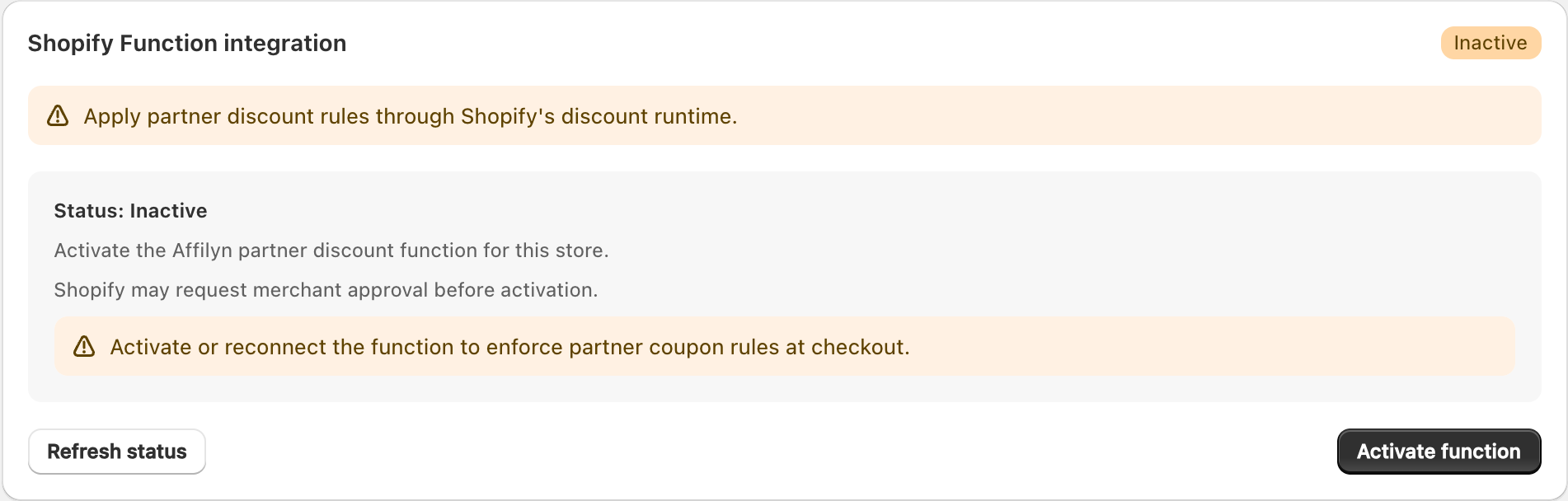
View full-size image: Shopify Function status
Settings explained
- Default storefront discount sets the starting rule for storefront offers.
- Maximum discount prevents discounts from going higher than the allowed limit.
- Stacking rule controls how the storefront discount behaves with other offers.
- Shopify Functions Integration shows whether the checkout discount function is unavailable, deployed but not activated, or fully active for the current shop.
Shopify Functions Integration
Use the Shopify Functions Integration card to confirm that the checkout discount system is actually ready for the current shop.
- Inactive means the shop does not currently detect the required Shopify Function. This page cannot activate a function that has not already been deployed to the shop.
- Deployed means the Shopify Function is present, but the automatic discount is not active yet.
- Active means the Shopify Function is deployed and the automatic checkout discount is active.
The actions in the card have different jobs:
- Refresh Status checks the current shop again and updates the status badge.
- Activate Discount Function activates the automatic discount for a Shopify Function that is already deployed.
- Reconnect Shopify App appears when the app needs to be re-authenticated for the current shop before status or activation can continue.
Activation does not deploy the Shopify Function. Deployment must already be present on the shop before activation can succeed.
Operational checklist
- Deploy the app version that includes the VIP discount Shopify Function to the target shop.
- Open Settings → Pricing Rules and review the Shopify Functions Integration card.
- If the card shows a reconnect error, click Reconnect Shopify App and complete the Shopify auth flow.
- Click Refresh Status.
- If the status becomes Deployed, click Activate Discount Function.
- Confirm that the status updates to Active before relying on automatic checkout discounts.
Example
A merchant decides that storefront offers can use a program discount but should never go above the approved maximum, keeps the stacking rule strict so the offer does not combine with other automatic promotions by mistake, then confirms the Shopify Function is Active before launching the offer.
Troubleshooting
If Shopify Functions Integration shows an invalid token or reconnect error, click Reconnect Shopify App, complete the Shopify auth flow, and then click Refresh Status again. If the card still shows Inactive after reconnecting, the Shopify Function has not been deployed to that shop yet. If the card shows Deployed, use Activate Discount Function to finish the setup.
Tips and limits
- Review discount rules before major storefront launches.
- Confirm the Shopify Functions status is Active before expecting automatic checkout discounts to apply.
- Keep pricing rules aligned with what partners are promising in content and campaigns.
- If the storefront result does not match expectations, check the pricing rules, the Shopify Functions status card, and the partner storefront discount settings.