
Payout Settings
Configure merchant-owned PayPal or Stripe providers, manual payouts, store policy, partner availability, and live payout safeguards.
When to use this page
- You need to connect, enable, rotate, refresh, or disconnect a payout provider.
- You need to configure automatic schedules, limits, holding periods, or partner availability.
Before you start
- Decide whether payouts will use PayPal, Stripe, Manual / Other, or a combination.
Success looks like
- At least one intended method is operational and enabled for partners.
- Store policy and live/sandbox environments match the intended workflow.
- Partners understand that destination confirmation and preferred selection are separate.
Where to find it
Merchant sidebar → Payouts → Payout setup and Payout policy
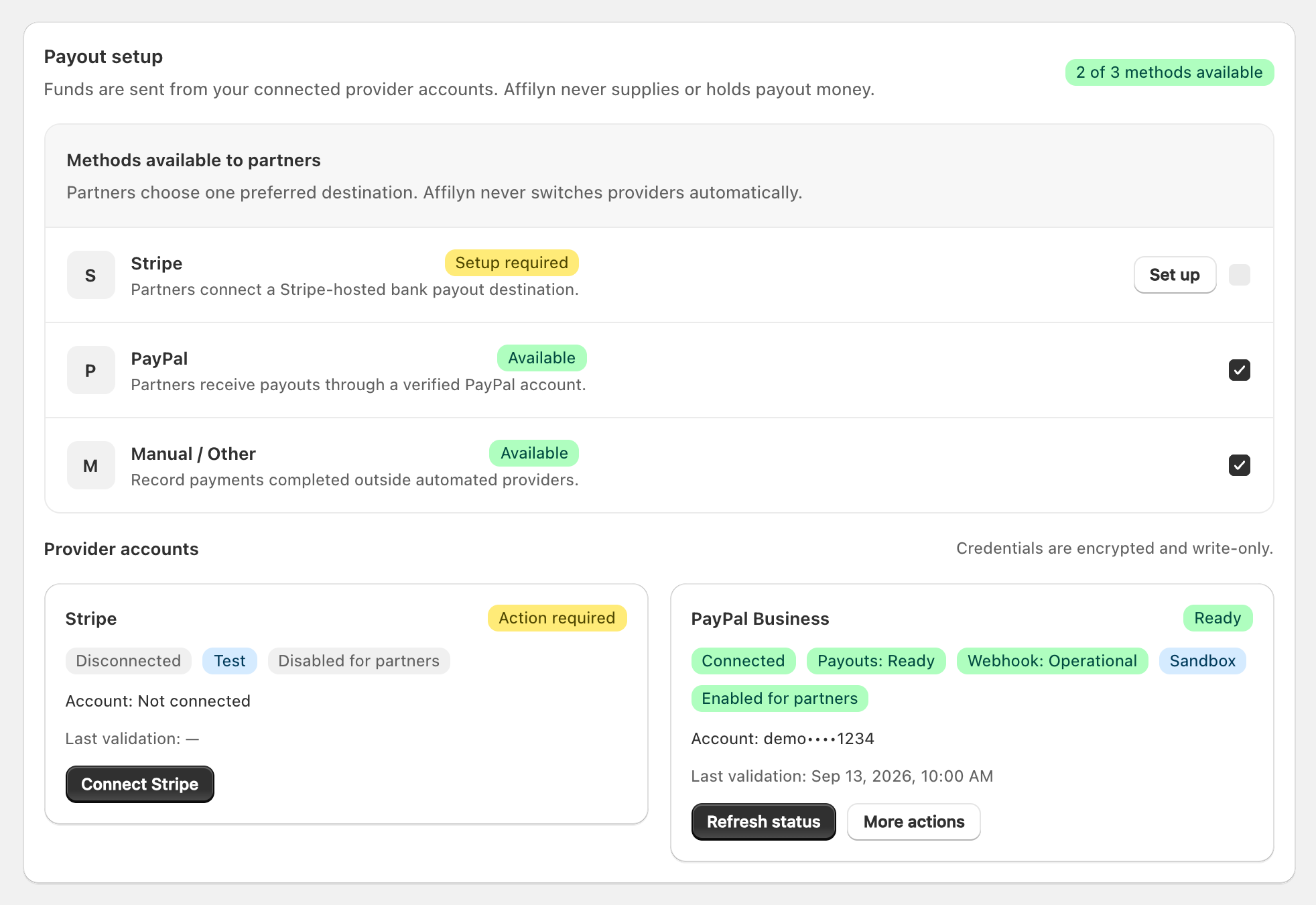
View full-size image: Merchant payout providers and availability
Configuration order
- Connect and validate each automated provider account.
- Enable operational methods for partners.
- Enable Manual / Other when off-platform payments are allowed.
- Save the store payout policy.
- Have partners configure and confirm their destinations.
- Verify live execution health with a controlled payout.
PayPal Business configuration
Use a PayPal REST application owned by the merchant. The selected environment must match Affilyn's payment runtime.
- In the PayPal Developer Dashboard, create/select the merchant REST application.
- Use Sandbox credentials for test runtime or Live credentials for production.
- Confirm the application/account has PayPal Payouts access and webhook-management permission.
- In Provider accounts → PayPal Business, choose Connect PayPal.
- Enter Client ID, Client Secret, and Sandbox/Live mode in the write-only form.
- Affilyn validates OAuth authorization and required scopes.
- Affilyn finds or registers the merchant PayPal webhook and stores its Webhook ID with the encrypted credential version.
- Confirm Connected, Payouts: Ready, and Webhook: Operational.
- Turn on Make PayPal available to partners.
PayPal cannot be enabled until credentials are connected, capability status is ready, webhook status is operational, and the credential has not been disconnected. Refresh status after changing PayPal permissions. Use More actions to rotate credentials or disconnect only when no active PayPal payout exists.
The merchant PayPal account supplies the funds. Affilyn does not provide a platform PayPal balance and does not require an Affilyn-global PayPal credential for merchant-owned execution.
Stripe configuration
- Connect the merchant-owned Stripe credential using the secure write-only form.
- Affilyn validates the account and required Connect/payout access.
- Refresh status until the provider is connected and payout capability is active.
- Enable Stripe for partners.
Stripe-specific webhook configuration remains relevant only when Stripe is used. It is not a provider-agnostic prerequisite for PayPal or manual payouts.
Manual / Other configuration
Manual is always operational because Affilyn does not contact a provider. Turn it on to let the merchant pay externally and record evidence in payout history. Manual does not create an automated partner payout and does not mean Affilyn has sent funds.
Partner availability versus provider connection
Each method has two independent states:
- Provider account ready: merchant credentials/capability/webhook are operational.
- Enabled for partners: partners may connect/select that method for this store.
A ready provider can remain disabled. An enabled toggle is blocked when the provider is not operational. Each partner must still create a store-scoped destination, confirm/verify it, and select one preferred provider.
Payout policy
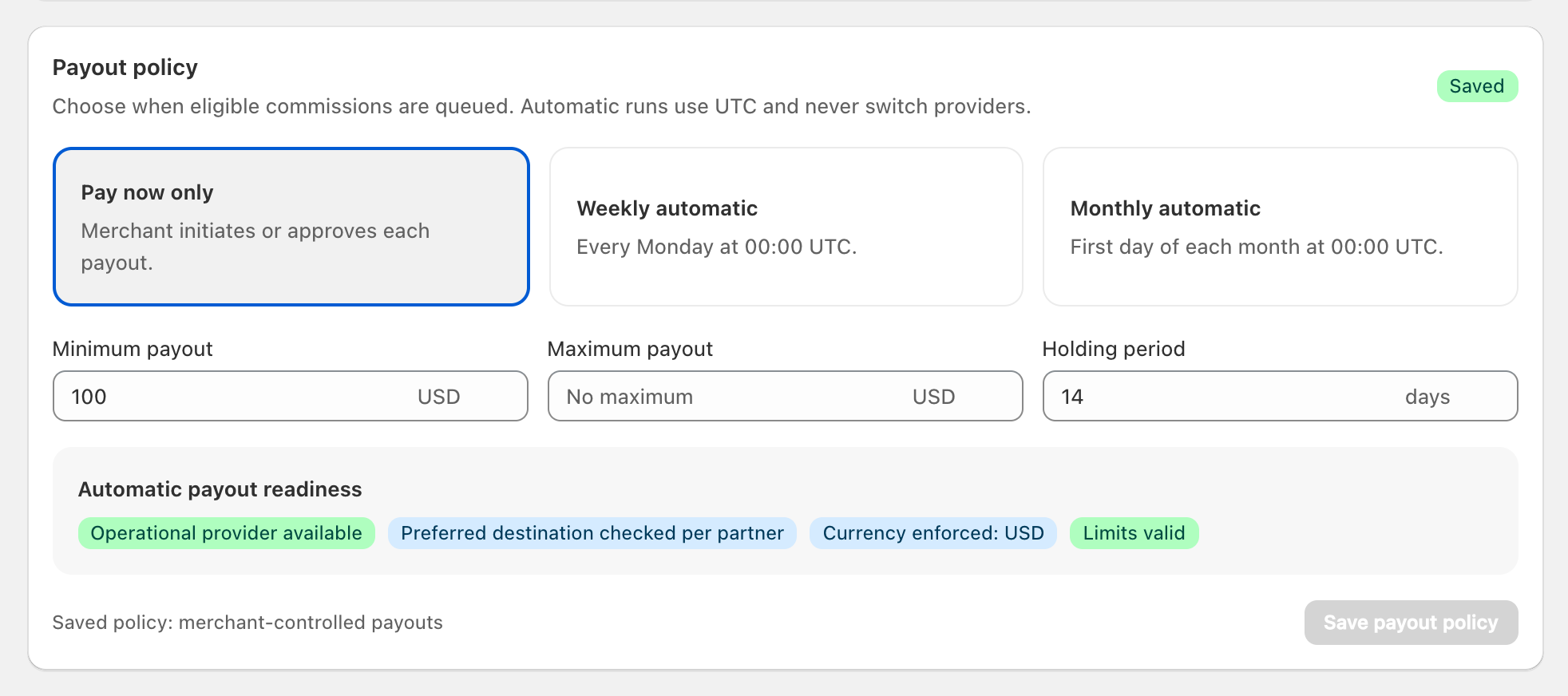
View full-size image: Merchant payout policy controls
| Setting | Behavior |
|---|---|
| Currency | Three-letter store payout currency; eligible commissions/destinations must match. |
| Minimum payout | Required available finalized balance. |
| Maximum payout | Optional cap; Affilyn selects whole eligible commission rows without exceeding it. |
| Holding period | 0–180 days after finalization before a commission becomes available. |
| Pay now only | Merchant initiates/approves each payout; no scheduled run creates it. |
| Weekly automatic | Runs Monday at 00:00 UTC. |
| Monthly automatic | Runs on day one of each month at 00:00 UTC. |
| Approval mode | Controls merchant review for on-request payouts. |
| Early request | Lets partners request before a scheduled run when all normal rules pass. |
| Fee policy | Currently merchant absorbs provider fees. |
Scheduled runs use the partner's preferred verified destination. If it is not ready, the partner is skipped safely—Affilyn never changes providers automatically.
Production safeguards
Provider credentials and the payout encryption key must be shared by the web
and worker processes. Live execution also requires production runtime, worker
authentication, and the explicit live-execution gate. The provider-neutral
preflight does not require STRIPE_WEBHOOK_SECRET when Stripe is unused.
Healthy internal preflight details are not shown to merchants. When automated payouts are unavailable, the merchant page shows a concise warning and keeps manual payout recording available.
Safe changes
- Rotate credentials instead of exposing or editing a saved secret.
- Do not mix Sandbox and Live provider modes.
- Provider disable/disconnect is blocked while requests or payouts use it.
- Confirm the provider has enough available funds before a live payout.
- Start with a low-value controlled live payout and verify provider reference, webhook/reconciliation, history, balances, and notifications.