
Language and Arabic support
Choose English or Arabic in the merchant app, follow your Shopify language, and understand what changes for you and your partners.
Before you start
- Open Affilyn from your Shopify Admin account.
Where to find it
Affilyn in Shopify Admin → language menu in the app header
Change your merchant app language
- Open Affilyn inside Shopify Admin.
- In the Affilyn app header, select the language icon and current language name, such as English.
- Choose English, العربية, or Follow Shopify.
- The app applies the language immediately. There is no separate Save button.
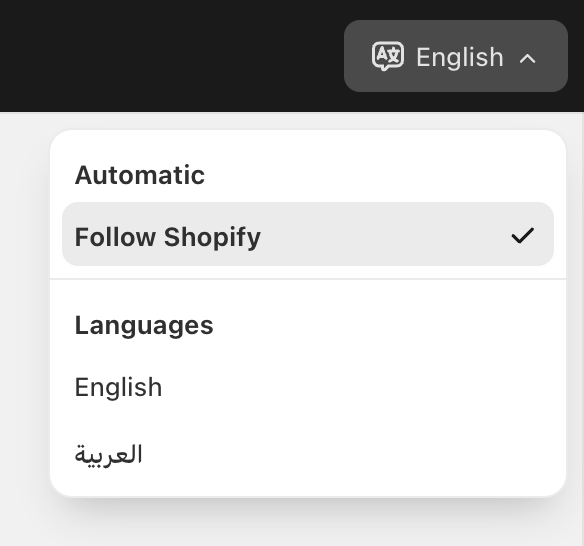
View full-size image: Merchant language menu
Save any unfinished merchant form before switching languages. Some merchant pages can reload their form state when the language changes.
Choose automatic or explicit language
| Choice | What it does |
|---|---|
| Follow Shopify | Uses the supported language supplied by Shopify Admin when available. |
| English | Keeps Affilyn in English, independently of Shopify's language. |
| العربية | Keeps Affilyn in Arabic and switches the app interface to right-to-left. |
When Shopify's language is unavailable or unsupported, Affilyn checks its saved language and browser preferences. English is the final fallback. If automatic selection is not showing the language you want, select English or العربية explicitly.
On a narrow screen, open the app's navigation menu and expand Language to find the same choices. Select the desired language to close the menu and apply it.
What Arabic changes
Arabic translates Affilyn's supported interface labels, menus, messages and guidance. Navigation and layouts use right-to-left direction, and numbers, dates, percentages and amounts use locale-aware formatting. This changes how values are displayed; it does not change prices, currencies, commission calculations or permissions.
Names, email addresses, URLs, product identifiers and other mixed Arabic/Latin content retain their original values. Product descriptions, partner biographies, merchant-authored messages and contract terms are not automatically rewritten or translated by this switch.
Your preference and your partners
- Your choice is remembered in this browser. You may need to choose it again in another browser, on another device, or after clearing site data.
- The merchant and Partner Portal preferences are separate. Choosing Arabic for your merchant app does not force Arabic on your partners.
- Partners choose their own language in Partner Portal → Settings. See Partner language and appearance.
- This menu changes Affilyn's merchant interface. It does not change Shopify Admin's account language, your public storefront's language, or automatically translate outgoing emails and generated documents.
If the language is not what you expected
Open the language menu and check the selected option. Choose an explicit language to override automatic selection, or choose Follow Shopify to return to automatic mode. If a preference disappears after reopening the app, check whether the browser clears or blocks site storage.