
Payout operations
Operate PayPal, Stripe, and manual payouts from partner setup through requests, automatic schedules, settlement, reconciliation, and confirmation.
Before you start
- Configure the store payout policy and at least one payout method.
Where to find it
Merchant sidebar → Payouts
Affilyn supports three payout methods:
- PayPal Business: automated payouts from the merchant's connected PayPal account to a partner's confirmed PayPal email.
- Stripe: automated payouts from the merchant-owned Stripe account to the partner's verified Stripe destination.
- Manual / Other: the merchant sends funds outside Affilyn and records the payment afterward.
Affilyn calculates and reserves commissions, routes the approved payment, records status, and reconciles outcomes. Affilyn does not supply, receive, or hold the merchant's payout funds and never switches a partner to another provider automatically.
Before paying anyone
- Open Payouts → Payout setup.
- Connect PayPal Business or Stripe, or enable Manual / Other.
- Enable each operational method that partners may use.
- Save currency, minimum, optional maximum, holding period, schedule, approval, and early-request policy.
- Ask each partner to configure and confirm a destination for this store.
- Confirm the intended automated destination is marked Preferred.
Provider connection, store method enablement, partner destination confirmation, and preferred selection are separate actions. Completing one does not imply the others.
How eligible money is calculated
Only finalized commissions that have passed the holding period and are not already reserved can be paid. Affilyn enforces the store currency, minimum, optional maximum, current provider readiness, destination status, and active payout locks on the server.
When a request or payout is created, Affilyn transactionally reserves the exact commission rows. This prevents the same earnings from being requested or paid twice. Rejection or a safe definitive failure releases the reservation; an unknown provider outcome stays reserved until reconciliation proves the result.
Partner-requested payout
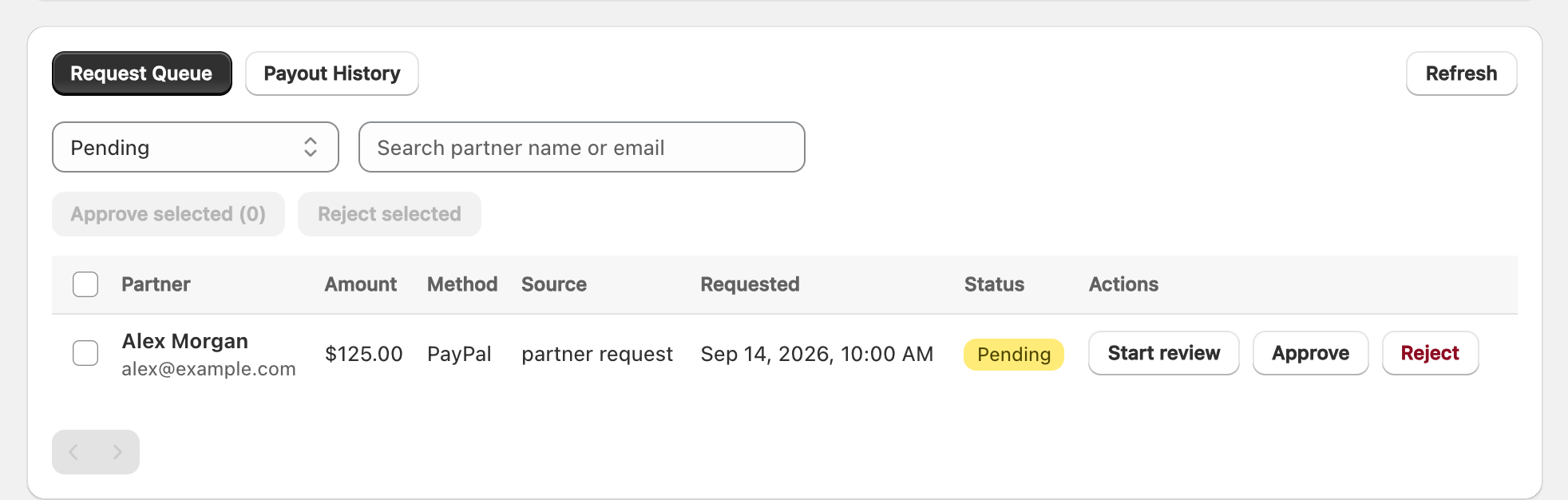
View full-size image: Merchant payout request queue
- The partner selects a confirmed/verified destination and submits Request payout.
- Affilyn calculates the eligible amount and reserves the included commissions.
- The request appears under Request Queue as
pending. - Select Start review when investigation begins.
- Check partner, amount, currency, provider, destination, funding account, policy, and fraud warnings.
- Choose Approve to create an idempotent execution job, or Reject to release the reservation.
- Approval means processing is authorized; it does not mean the partner has been paid.
Bulk approval is limited to requests whose selected provider remains runnable. If one provider is unavailable, requests using another operational provider can still proceed.
Pay now
Use Pay now when the merchant wants to initiate an automated payout without waiting for a partner request.
- Search for and select the partner.
- Affilyn calculates the eligible finalized commissions on the server.
- Review amount, currency, preferred provider, masked partner destination, and merchant funding account.
- Confirm the payout.
- Affilyn reserves the commission rows and queues provider execution.
Pay now uses the partner's preferred ready provider. It does not silently fall back to another destination.
Weekly and monthly automatic payouts
Choose Weekly automatic or Monthly automatic in the payout policy:
- Weekly runs every Monday at 00:00 UTC.
- Monthly runs on the first day of each month at 00:00 UTC.
At each run, Affilyn evaluates partners independently. A partner is paid only when the preferred destination is ready, the provider is enabled, currency and limits match, the holding period has passed, the threshold is met, and no active payout conflicts. A failing partner is skipped safely and does not cause Affilyn to switch provider.
Manual payout
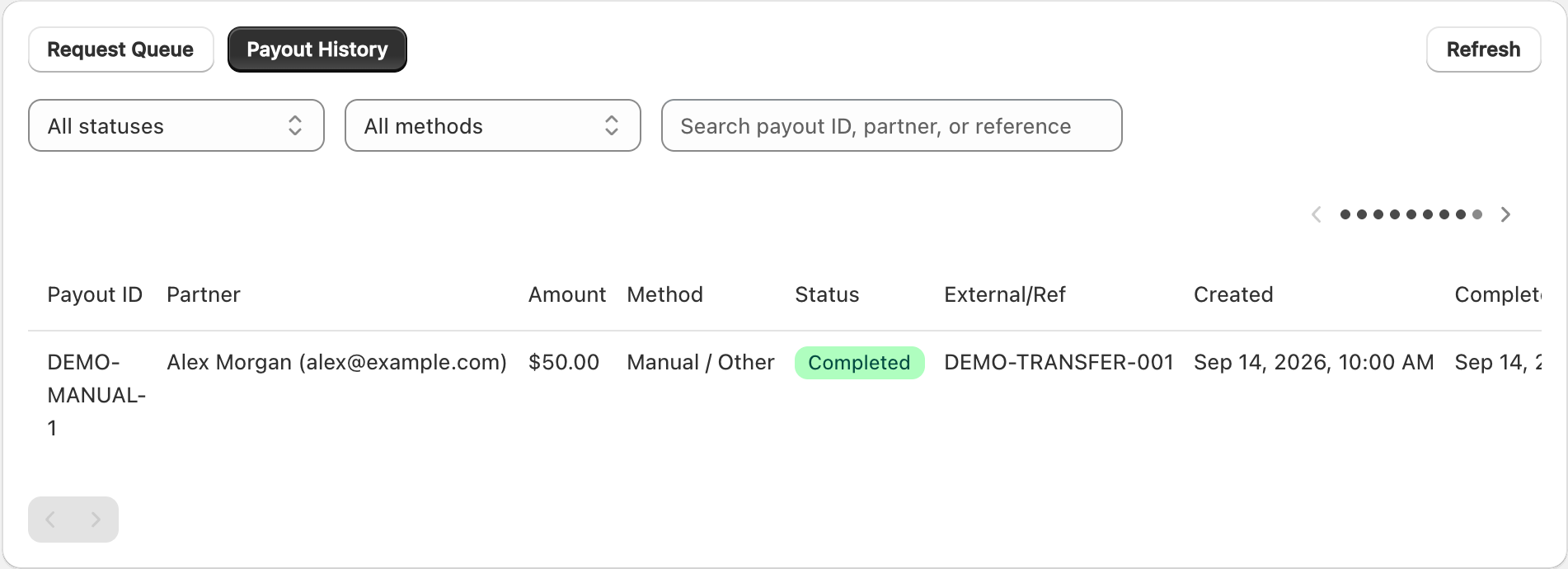
View full-size image: Manual payout history example
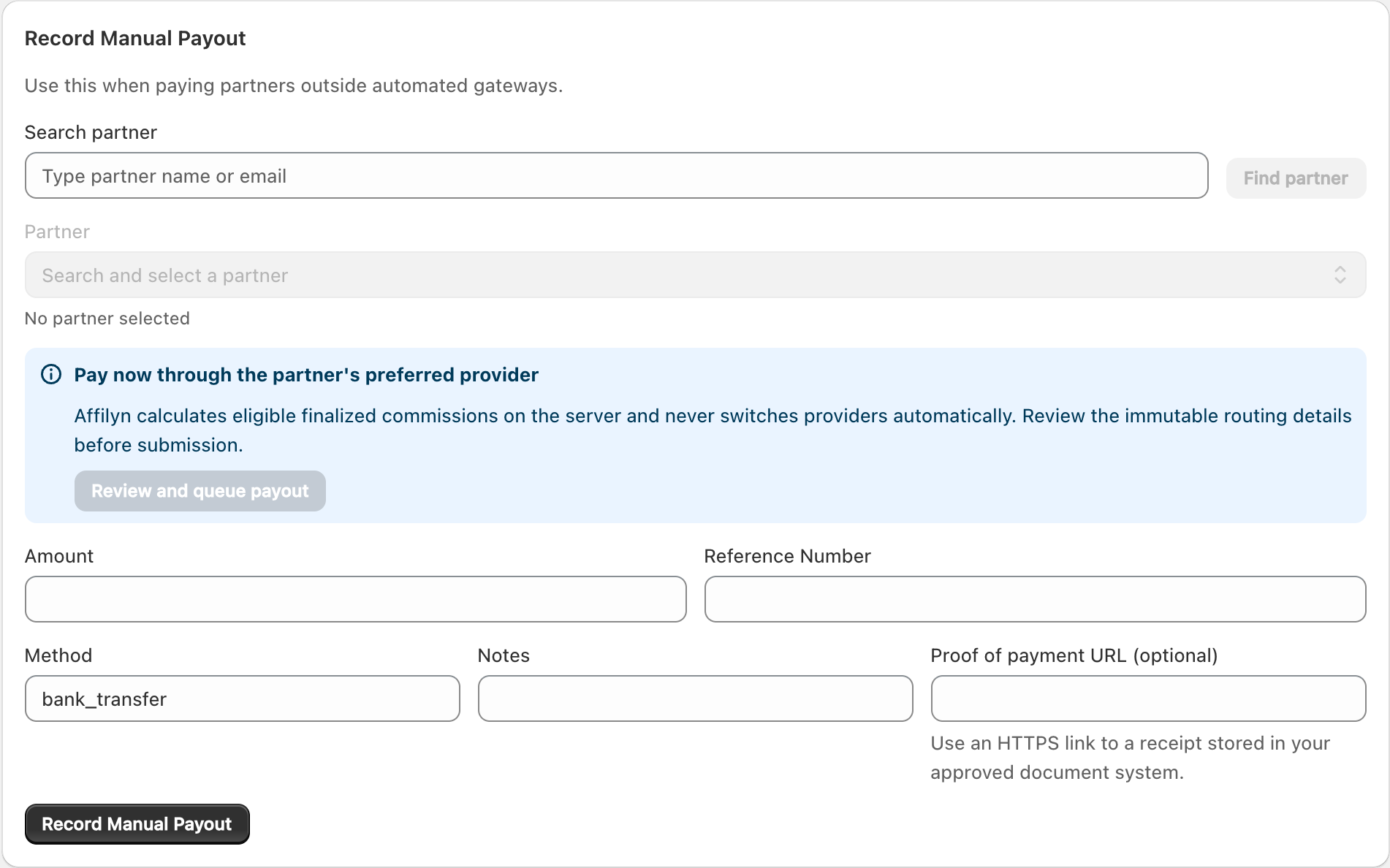
View full-size image: Record a manual payout
Manual payout has two distinct parts:
- Move the money outside Affilyn using bank transfer, cash, cheque, PayPal manual send, or another agreed method.
- Record the completed payment in Affilyn.
To record it:
- Open Record Manual Payout.
- Search and select the partner.
- Enter the amount and currency shown by the form.
- Enter a unique reference number from the external payment.
- Select/enter the method, notes, and optional HTTPS proof-of-payment URL.
- Review the partner and payment evidence, then save.
Recording a manual payout does not send money. Do not record it until the external payment has actually been authorized according to the merchant's internal process. Clear references and proof links are important for partner support, accounting, and audits.
Automatic processing and confirmation
After request approval, Pay now, or a scheduled run:
- An idempotent job claims the reserved payout.
- Affilyn uses only the selected merchant-owned provider credentials.
- PayPal creates a payout batch/item; Stripe creates its provider operation.
- The payout becomes
processingafter provider acceptance. - Signed provider webhooks and reconciliation confirm the authoritative outcome.
- Only confirmed success changes commissions to paid.
- Notifications, ledger entries, payout history, provider reference, and audit history are updated.
Never create a duplicate payment because a payout remains processing. Use Retry safely only for a dead-letter job after confirming the provider did not already complete it. Idempotency and reconciliation protect against repeat submission, but operators must still investigate unknown outcomes.
Statuses
| Status | Meaning | Merchant action |
|---|---|---|
| pending | Partner request awaits review; commissions are reserved. | Review or reject. |
| under review | Merchant review started. | Complete the review. |
| approved | Execution is authorized and queued. | Wait for the worker. |
| queued | Automatic provider submission is waiting. | Do not duplicate. |
| processing | Provider accepted the request; settlement is not yet proven. | Wait for webhook/reconciliation. |
| unclaimed | PayPal recipient has not claimed the payout. | Wait or use Cancel unclaimed when appropriate. |
| paid | Provider success was verified. | No action; retain the record. |
| rejected/cancelled | Request stopped before payment. | Reservation is released. |
| failed | Definitive provider failure. | Resolve the cause and retry only when safe. |
| reversed/returned | Provider returned or reversed funds. | Review ledger and partner balance. |
| outcome unknown | Success or failure cannot yet be proven. | Reconcile; never pay again blindly. |
For an unclaimed PayPal item, Cancel unclaimed asks PayPal to return the funds. After PayPal confirms the return, Affilyn releases the associated commissions back to available balance.
Configuration locks and changes
- A provider cannot be disabled, disconnected, or replaced while its requests or payouts are active.
- Credentials are encrypted and write-only; the UI displays only masked references.
- Sandbox/test and live credentials are isolated.
- Partners cannot replace or disconnect a destination while it is reserved or processing.
- Changing a partner's preferred provider affects future payouts only; existing payouts retain immutable provider and destination snapshots.
Troubleshooting
- Approval disabled: the request's provider is no longer operational or enabled.
- Partner cannot select PayPal: merchant PayPal setup, Payouts permissions, webhook, enablement, or partner email confirmation is incomplete.
- Partner cannot request: threshold, holding period, policy, destination verification, currency, or an existing active payout is blocking it.
- Processing too long: inspect provider reference, webhook health, and reconciliation; do not duplicate.
- Manual record is wrong: preserve the audit trail and follow the authorized correction/reversal process rather than deleting financial history.