
Storefront and campaign issues
Fix live storefront, application CTA, builder, product, discount visibility, and email campaign problems with current support checks.
Before you start
- Confirm whether the issue affects the live storefront, the builder, or a marketing campaign.
Where to find it
Documentation → Troubleshooting → Storefront and campaign issues
Steps
- Confirm the affected surface: live storefront, builder preview, Shopify Theme Editor, application modal, merchant storefront list, Discount Visibility, or Marketing → Email Campaigns.
- Confirm the store, partner, storefront URL, and whether the reporter is a merchant, VIP Partner, applicant, or shopper.
- Compare the live storefront or preview with the builder before changing content.
- Check access mode, published state, product selection, discount mode, and discount scope before editing design.
- For application issues, check both admin settings and the published theme because public intake depends on both.
- For campaign issues, check campaign status, required fields, reply details, audience filters, Email Sync, and scheduled timing before editing message copy.
Common causes
- Live storefront mismatch often comes from reviewing the wrong store or URL, unsaved builder changes, private access mode, or a stale preview.
- Application CTA issues often come from Allow partner applications being off, the Partner Apply Button missing from the published theme, or Partner Application Modal being disabled.
- Missing builder tools often come from the wrong active store, missing VIP access, or using a merchant list view instead of the VIP Storefront Management route.
- Missing products often come from product selection, unavailable synced products, or category and featured-product rules that no longer match the intended storefront.
- Discount confusion often comes from display mode, hidden anti-leak behavior, discount scope, category rules, or checking the storefront without comparing Discount Visibility.
- Campaign send issues often come from missing required fields, reply details, audience filters, Email Sync setup, scheduled timing, or a status that does not allow sending again.
Example
A merchant says applications stopped arriving after a launch. Support checks Settings → Application Settings to confirm Allow partner applications is on, opens Shopify Theme Editor to verify the published theme includes Partner Apply Button and enabled Partner Application Modal, submits a unique test application from the live storefront, and confirms the request appears in Partners → Pending Requests before escalating.
Live storefront checks
- Open the exact live storefront or preview URL reported by the shopper, partner, or merchant.
- Confirm the storefront belongs to the expected store and VIP Partner.
- In the builder, review Layout & Theme, Products, Access Control, and SEO for the same store.
- Check whether the storefront is public, password-protected, or token-based.
- Review first-time and returning-visitor behavior in a fresh or private browser session if welcome messaging looks inconsistent.
- Check seasonal styling and campaign-specific messaging only after confirming the base storefront and store context are correct.
The merchant list is a useful first access check. The screenshot uses a fictional storefront and does not establish whether a particular public URL or preview is reachable.

View full-size image: Check storefront access in the merchant list
Application CTA checks
- In Settings → Application Settings, confirm Allow partner applications is on when the merchant wants public intake.
- Confirm the notification email is correct if the issue is missing application alerts.
- In Shopify Theme Editor, confirm the Partner Apply Button app block is placed in the published theme.
- In App embeds, confirm Partner Application Modal is enabled and its modal title, success message, and reCAPTCHA site key are set as expected.
- Submit a test application with a unique email address.
- Confirm the success message appears on the storefront and the new application appears in Partners → Pending Requests.
- If the button is visible but submissions are blocked, check whether applications were closed in admin while the theme block remained published.
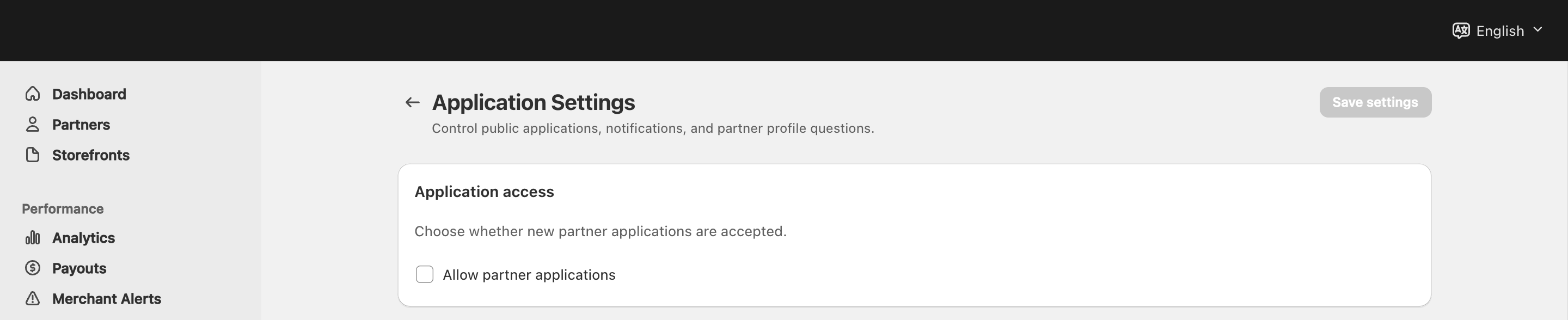
View full-size image: Check whether public applications are closed
Builder and product checks
- For a VIP Partner, switch to the active VIP store, then open Storefront Management.
- For a merchant, open Storefronts, search for the partner storefront, confirm access mode, then open the builder from that row.
- Confirm the builder tabs show the expected content, layout, products, access, discount, and SEO controls.
- If products are missing, review selected products first, then check whether product sync or category rules need attention.
- Save builder changes and refresh the preview before comparing against the live storefront again.
Discount visibility checks
- In the builder, open Access Control and review discount display mode and scope.
- Confirm whether the discount should be visible to shoppers or hidden for anti-leak protection.
- Confirm whether the discount applies to all storefront products, featured products, selected products, or configured categories.
- Open Discount Visibility from the active VIP store to compare the active discount source, display mode, coverage, global limits, stacking status, and conversion impact.
- Re-check the live storefront after any discount change so the public promise matches the current configuration.
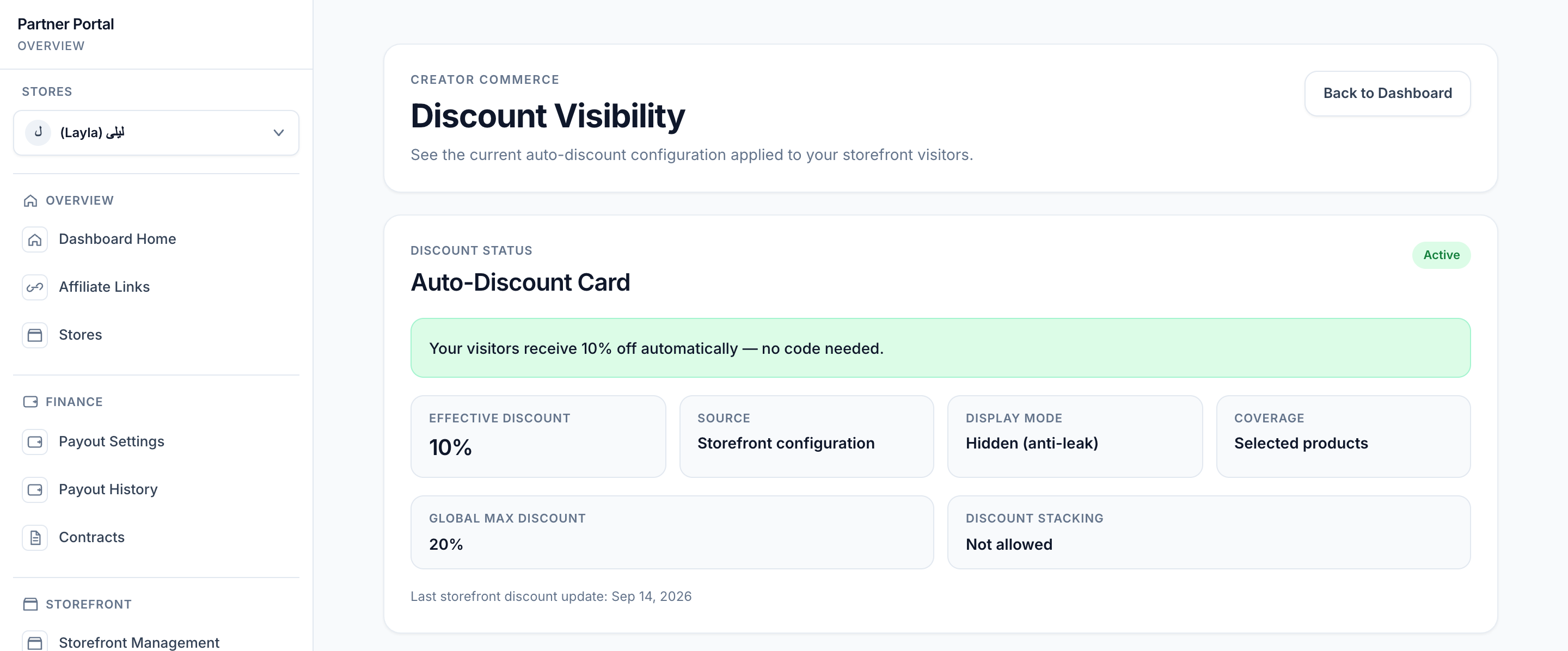
View full-size image: Compare discount display mode and product coverage
Email campaign checks
- Open Marketing → Email Campaigns and confirm the campaign status before making edits.
- Review the audience filters before changing the message. The wrong audience can make a correct message look broken.
- Confirm required fields and reply details are complete.
- Use preview to check the final message.
- Send a test email before scheduling or sending a large campaign.
- If contact data or audience behavior looks incomplete, review Settings → Email Sync for provider, audience or list, profile properties, and order event sync settings.
- If a scheduled campaign did not send, confirm the scheduled time, current status, and whether the campaign has already been sent or canceled.
For a canceled campaign, inspect the status warning before changing fields. The example below shows the actual Re-enable recovery control; re-enabling changes campaign state, so use it only when you intend to resume work on that campaign.
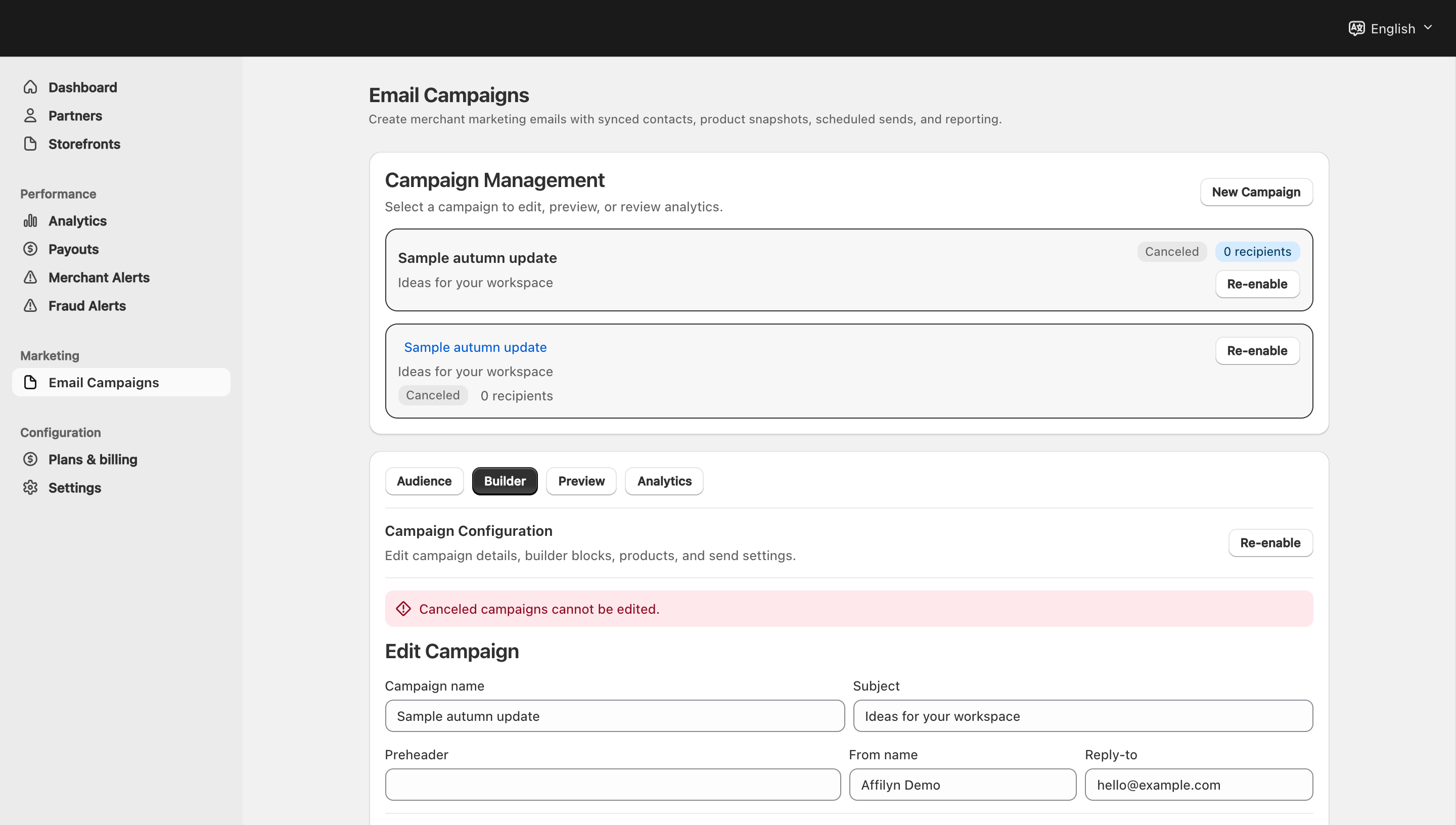
View full-size image: Identify a canceled campaign before retrying edits
Tips and limits
- Compare the builder with the live view before assuming a design change failed.
- Public application intake requires both admin access and published Theme Editor setup.
- If the discount looks wrong, check both storefront configuration and Discount Visibility before changing campaign copy.
- Campaigns are easier to fix when you confirm status, audience, and Email Sync before editing the message.
- A submitted public application does not create dashboard access until the merchant approves or invites the applicant.
Common fixes
| Problem | First check | Next check |
|---|---|---|
| Live storefront looks different from builder | Confirm the URL, store, and partner are the same | Save changes, refresh preview, and review access mode |
| Storefront is not publicly reachable | Check access mode in Access Control | Confirm whether password or token access is intentional |
| Apply button is missing | Check Partner Apply Button in the published theme | Confirm Allow partner applications and Partner Application Modal |
| Apply button shows but submission is blocked | Check Allow partner applications | Remove or hide the theme block if applications are intentionally closed |
| Application does not appear in review queue | Submit a unique test application | Check Partners → Pending Requests and notification email routing |
| Builder is missing for VIP Partner | Confirm VIP access in the current store | Switch to the active VIP store and open Storefront Management |
| Builder is missing for merchant | Open Storefronts and find the VIP storefront | Confirm the access mode and open the storefront row |
| Products are missing | Check selected products in the builder | Review product sync and category or featured-product scope |
| Discount is not appearing correctly | Check Access Control discount mode and scope | Compare live storefront with Discount Visibility |
| Campaign cannot send | Check campaign status, required fields, and reply details | Review audience filters, Email Sync, and scheduled timing |
| Test email did not arrive | Confirm the test recipient and inbox filters | Check sender/reply details and try one fresh test |