
Access, login, and store context issues
Fix magic-link login, missing dashboard access, wrong store context, profile-only states, and missing VIP tools.
Before you start
- Confirm which account email and store relationship are affected.
Where to find it
Documentation → Troubleshooting → Access, login, and store context issues
Steps
- Confirm who is blocked: merchant, applicant, Standard Affiliate, or VIP Partner.
- Confirm the exact email address used for signup, application, approval, invitation, and login.
- Ask where the person is stuck: login page, magic-link email, partner dashboard, Stores, store switcher, or a specific tool.
- In the dashboard, confirm the active store and whether the account is in full access, store-limited access, or profile-only access.
- If VIP tools are missing, confirm the current store grants VIP Partner access before checking individual pages.
- If the person applied from a storefront, confirm the application was approved or invited before treating it as a login problem.
Common causes
- Magic link problems usually start with the wrong inbox, spam filtering, an expired link, or a different email than the one used for the partner profile.
- Application confusion happens when a public storefront application was submitted but has not yet been approved into dashboard access.
- Profile-only access means the partner can sign in, but no active store affiliation exists yet.
- Store context issues happen when the dashboard is open in a different store than the one being discussed.
- VIP tool issues usually come from store-specific tier access. A partner can be Standard in one store and VIP in another.
- Disconnected store notices mean the dashboard may redirect to the default store because the previous store is no longer active.
Example
A VIP Partner thinks the storefront builder disappeared, but the problem is that the dashboard opened in a different store where the partner only has standard access.
Support checklist
- Ask for the account email and compare it with the email used in the application, invitation, or approval record.
- If the magic link did not arrive, check spam, promotions, and security filters, then request one fresh link and use the newest email.
- If the magic link opens the wrong dashboard state, open Stores and review active affiliations, disconnected stores, default store, and tier labels.
- If a storefront applicant cannot log in, confirm the merchant has approved or invited the applicant. A submitted public application alone does not create partner dashboard access.
- If VIP pages are missing, switch to the store that grants VIP access, then look for Storefront Management, Bundle Manager, Advanced Analytics, and Discount Visibility.
- If the dashboard redirects after switching stores, confirm whether the previous store became disconnected and whether the default store is now taking over.
Tips and limits
- Check the active store before assuming a feature was removed.
- Use the same email for storefront applications, general partner signup, invitations, and login whenever possible.
- If a magic link never arrives, confirm the account email before requesting more links. Multiple fresh links can make it harder to know which one is valid.
- If the store selector shows only one store, that can still be correct when one active affiliation exists.
- Store switching changes dashboard context only. It does not change previously shared public storefront or profile links.
Common fixes
| Problem | First check | Next check |
|---|---|---|
| Magic link did not arrive | Confirm the exact partner account email | Check spam, promotions, security filters, then request one fresh link |
| Magic link says expired or invalid | Confirm the newest email is being used | Request a fresh link and avoid older sign-in emails |
| Applicant can submit but cannot log in | Confirm whether the merchant approved or invited the applicant | Check Partners → Pending Requests under the merchant account |
| Dashboard only shows profile tools | Confirm whether active store affiliations exist | Ask the merchant to approve, invite, or restore the store relationship |
| VIP tools are missing | Confirm the active store | Confirm VIP access still applies to that store |
| Storefront Management is missing | Switch to the VIP store | Check whether the partner is Standard in the current store |
| Redirected unexpectedly | Check whether the selected store was disconnected | Review the default store and switch back if needed |
| Store switcher is missing or limited | Confirm whether there are active affiliations | Check whether account data is still loading or unavailable |
Recognize the recovery state
These screenshots use fictional sample data. Match the message and store context to the reported issue before taking a recovery action.
Expired or invalid sign-in link
Choose Request New Link, request one fresh link for the correct partner email, and use the newest message. An expired link does not mean the partner profile was deleted.
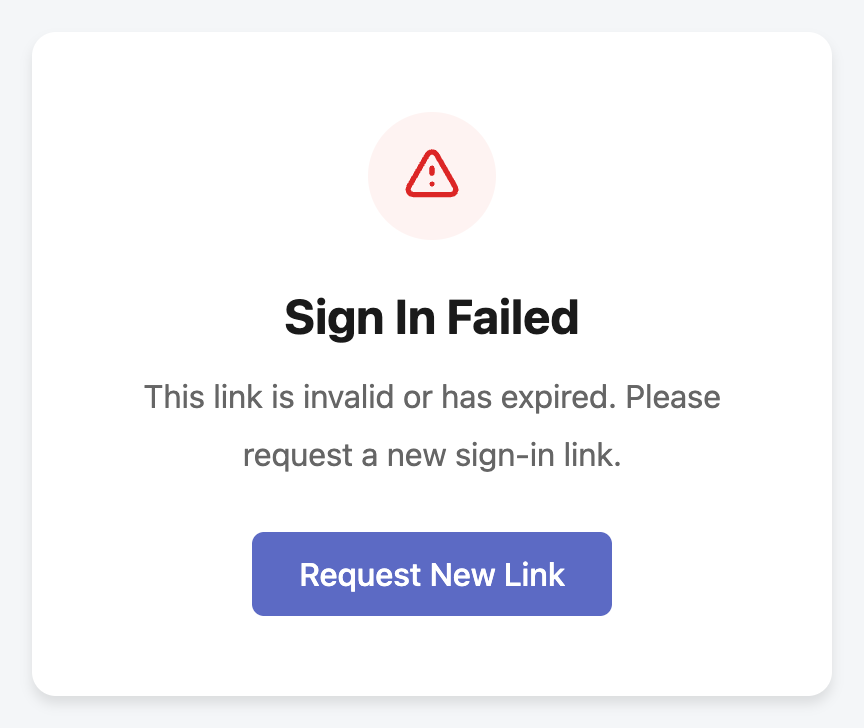
View full-size image: Recover from an expired sign-in link
Profile-only access
A successful sign-in can still lead to profile-only access. Open Stores helps confirm whether there are active relationships; signing in again does not create an affiliation.
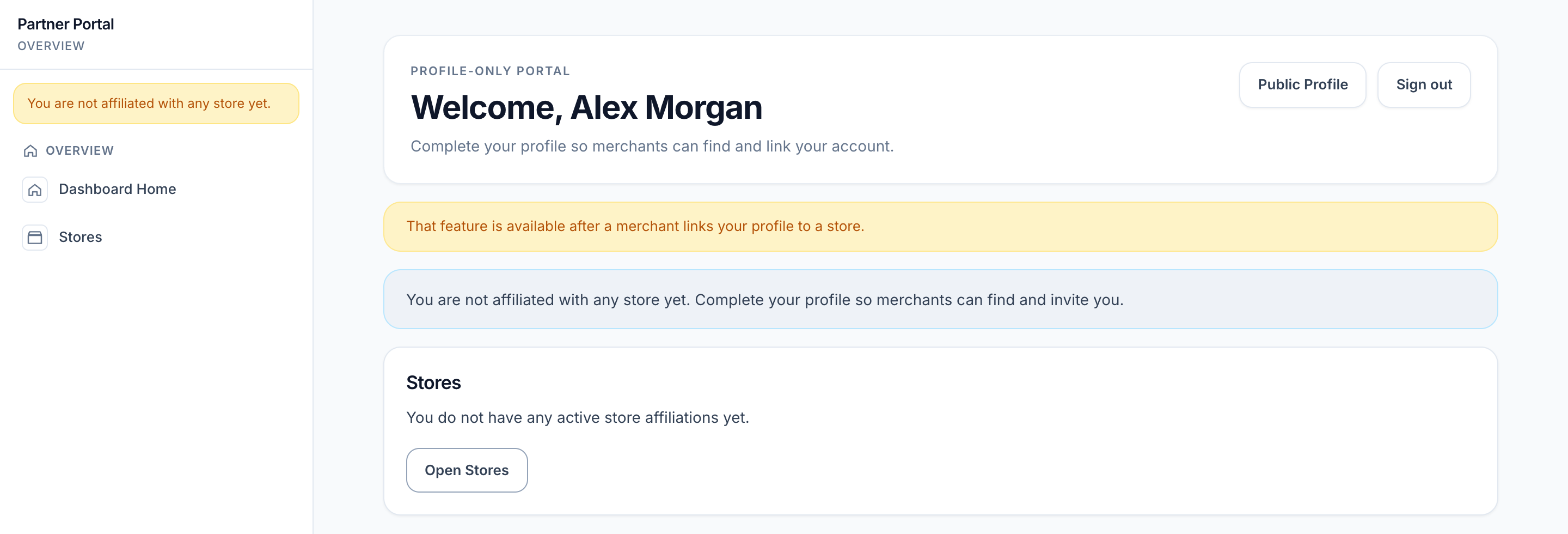
View full-size image: Signed in without an active store affiliation
Disconnected-store recovery
Read the redirect notice and the store selected in the sidebar. Confirm the intended relationship before continuing with store-specific work.
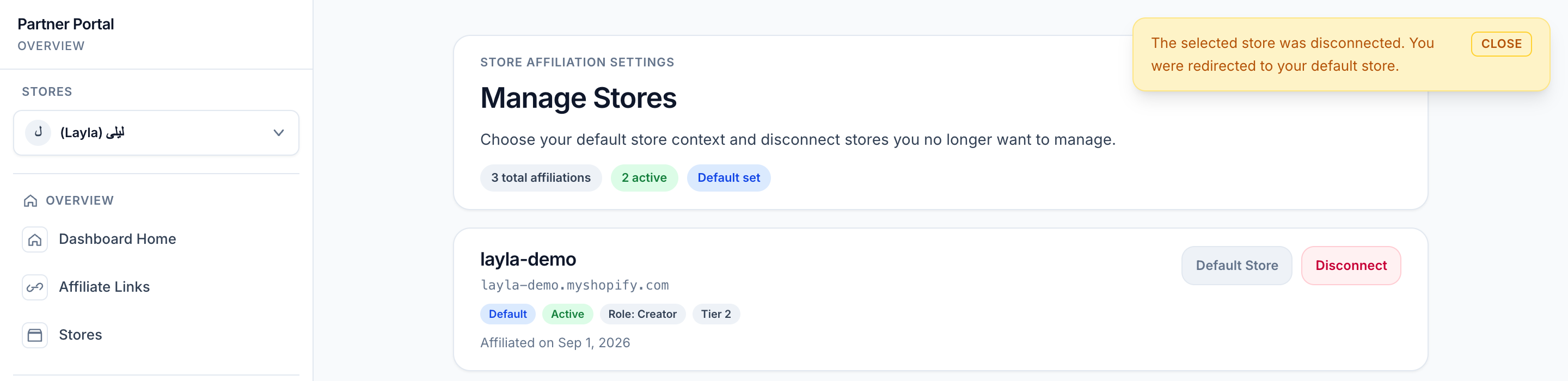
View full-size image: Recovery after a store becomes disconnected