
Standard Affiliate, VIP Partner, and Storefront
Understand Tier 1 and Tier 2 partner relationships, how access changes by store, and how a VIP storefront turns partner promotion into a curated shopper experience.
When to use this page
- You need a plain-language explanation of the difference between Standard Affiliate, VIP Partner, and Storefront.
- You are deciding which tier a partner should have or why a feature appears in one store but not another.
- You want to understand what changes when a partner is promoted or demoted.
Before you start
- Know whether you are viewing the app as a merchant, partner, or storefront visitor.
Success looks like
- You can distinguish a partner account, a store affiliation, a tier, and a storefront.
- You understand the default Tier 1 and Tier 2 toolsets and the additional access gates.
- You can explain the journey from tracked link to attributed order and commission.
- You know what promotion, tier locking, demotion, draft state, and publication mean.
Where to find it
Merchant Settings → Tier Configuration; Partner dashboard → Stores; VIP dashboard → Storefront Management
The short explanation
Affilyn uses two partner tiers by default:
- Standard Affiliate (Tier 1) is the link-based partner relationship. The partner promotes products with tracked links, monitors performance, manages payout details, and works with the merchant without needing a personal storefront.
- VIP Partner (Tier 2) is the deeper brand-partner relationship. The partner keeps the standard tools and can receive enabled premium tools such as a personal storefront, bundles, advanced analytics, discount controls, premium assets, UGC rights, and gifting.
- A Storefront is the shopper-facing page associated with a VIP partner. It presents the partner's story, selected products, content, offers, and tracking context. It is not a third partner tier.
Merchants can rename the two tiers. For example, Tier 1 could be called Ambassador and Tier 2 could be called Creator Partner. The underlying access model is still Tier 1 and Tier 2.
Free VIP designation and tier are not the same thing
Every shop has a permanent free entitlement for four Standard affiliations and one merchant-designated VIP affiliation with storefront access. The designation identifies which eligible affiliation consumes the free VIP/storefront slot; it does not erase tier history and is independent from paid capacity.
On paid plans, paid partner/storefront allowances are added to the five free slots. On cancellation or expiry, the merchant selects five affiliations to remain active and chooses the one free VIP. Excess affiliations are paused, not deleted, and storefront/business data remains preserved. A paused or non-designated storefront cannot be published unless paid storefront capacity or the free VIP designation grants access again.
Four objects that should not be confused
| Concept | What it represents | Example |
|---|---|---|
| Partner account | The person's identity, login, profile, and shared account-level information. | Maya signs in once with [email protected]. |
| Store affiliation | Maya's relationship with one merchant store, including status, tier, and whether it is her default store. | Maya is active in Store A as Tier 1 and Store B as Tier 2. |
| Tier | The access and commission level inside the selected store relationship. | Store B grants Maya VIP tools and its Tier 2 commission rate. |
| Storefront | The curated shopper page used when VIP storefront access is available. | Shoppers open Maya's Store B page to browse her featured products. |
The active store matters. Switching stores can change the tier label, commission rules, available tools, products, storefront configuration, links, analytics, payout context, and contracts shown in the dashboard.
The relationship flow
From merchant program to shopper experience
Tier 1 is the link-based starting relationship. Tier 2 adds enabled premium access, including the storefront shopper experience.
Merchant
Defines the program
Sets tier names, commissions, feature mapping, promotion rules, and subscription access.
Tier 1
Standard Affiliate
Promotes with tracked links and uses profile, store, payout, and contract tools.
Tier 2
VIP Partner
Keeps standard tools and gains the premium features enabled for the selected store.
Storefront
Shopper experience
Presents the VIP partner’s content, selected products, offers, and attribution context.
Merchant store
    |
    +-- defines Tier 1 and Tier 2 names, commission rates, and feature mapping
    |
    +-- creates or approves a partner relationship
            |
            +-- Tier 1: Standard Affiliate
            |      |
            |      +-- tracked links
            |      +-- profile, stores, payouts, and contracts
            |      +-- progress toward Tier 2 when evaluation is enabled
            |
            +-- Tier 2: VIP Partner
                   |
                   +-- keeps the standard partner tools
                   +-- receives enabled VIP tools
                   +-- receives a storefront record if one does not exist
                              |
                              +-- content and layout
                              +-- featured products and bundles
                              +-- access, discount, and SEO settings
                              +-- public or protected shopper experience
Tier 1: Standard Affiliate
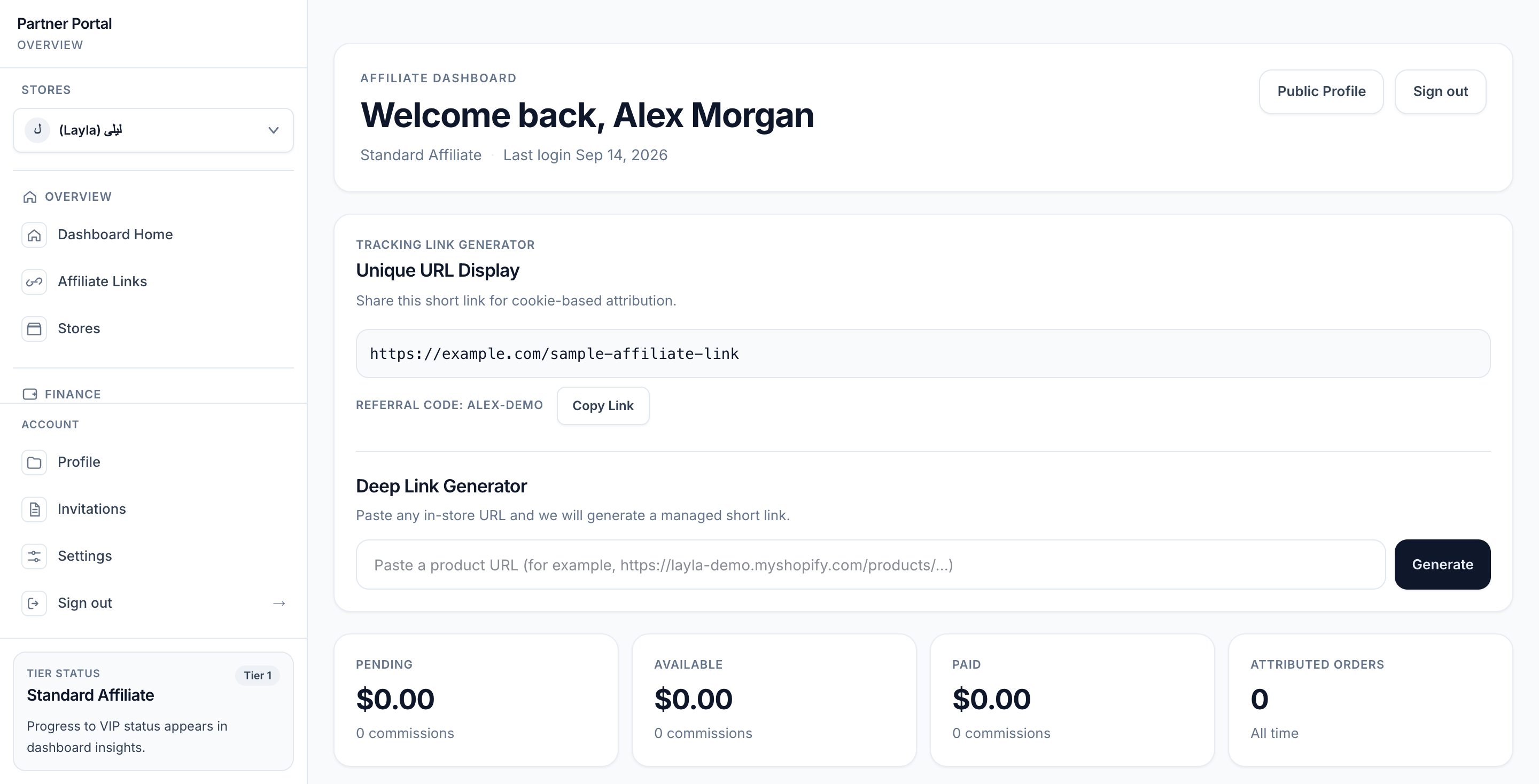
View full-size image: Standard Affiliate dashboard
Tier 1 is the normal starting point for a partner who promotes a merchant's products through tracked links. The current Tier Configuration screen describes this model as suitable for link-based partners such as bloggers, coupon publishers, and micro-influencers, but a merchant may use it for any standard partner relationship.
Default Tier 1 work
| Area | What the partner does |
|---|---|
| Dashboard and profile | Reviews current performance and maintains public and private profile details. |
| Affiliate Links | Searches the active store's catalog and creates tracked product links. |
| Stores | Reviews affiliations, tier labels, status, and default store; switches active store context. |
| Payout Settings | Configures an available payout destination, checks eligibility, requests payout, and reviews history. |
| Contracts | Reviews, signs, and downloads agreements sent by the merchant. |
Affiliate Links are enabled for both tiers in the default feature matrix. Other premium feature keys default to off for Tier 1, although a merchant can change the store's tier feature mapping.
How Tier 1 earns commission
Partner copies tracked link
          ↓
Shopper opens the merchant product or partner experience
          ↓
Affilyn records attribution context
          ↓
Shopper places an eligible order
          ↓
Commission is calculated from the applicable rate and basis
          ↓
Commission completes its hold period
          ↓
Eligible balance can enter the payout workflow
The tier's commission rate is a default. A partner-specific commission override or campaign rate can change the effective rate for a particular relationship or campaign. Attribution rules, refunds, fraud review, hold periods, and payout policy also affect what eventually becomes payable.
Tier 2: VIP Partner
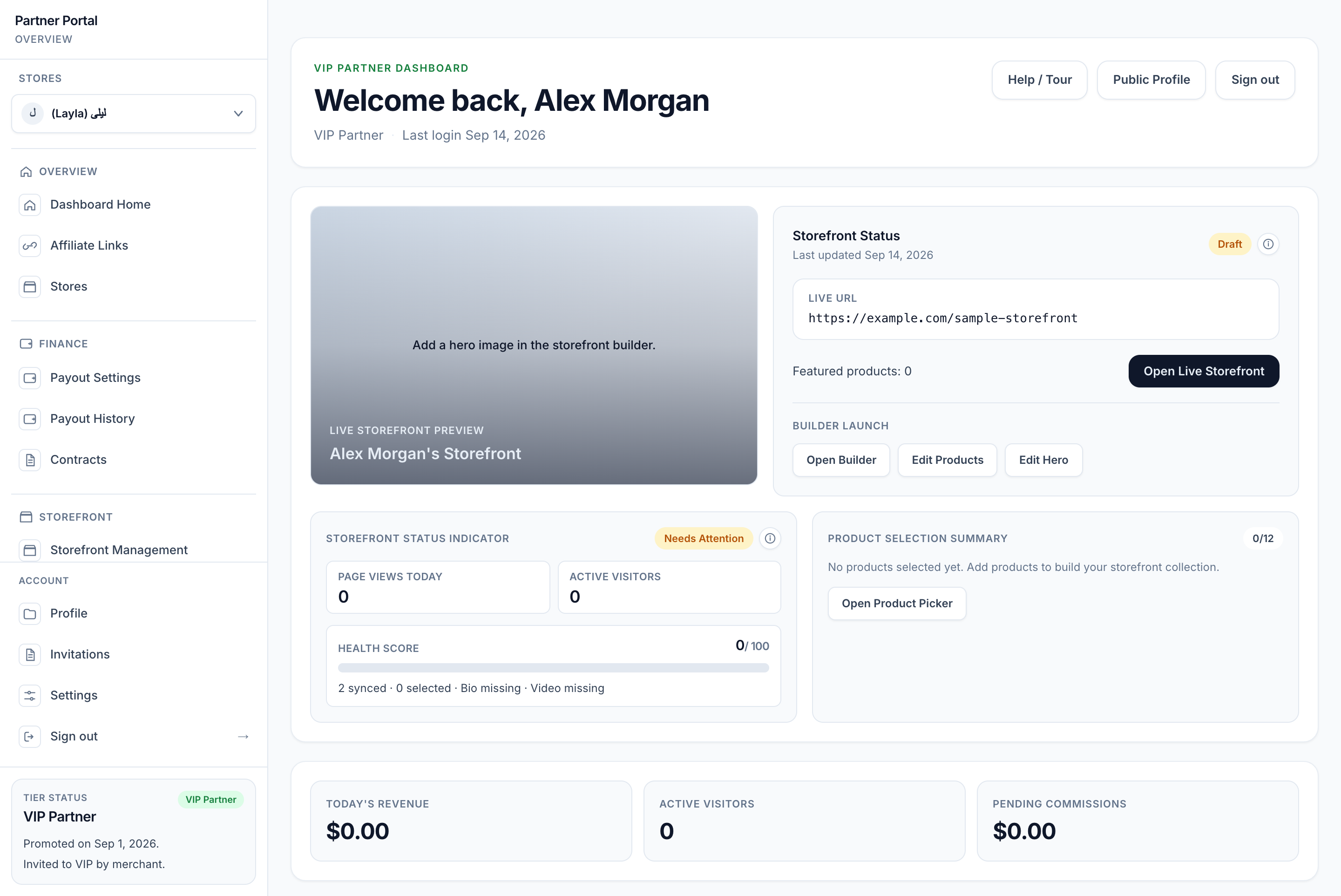
View full-size image: VIP dashboard and draft readiness
Tier 2 represents a higher-touch relationship for a partner who may curate a shopper experience and work more deeply with the merchant's brand. A VIP Partner still has the standard partner tools; Tier 2 adds the premium feature set that the merchant has enabled and that the merchant's subscription includes.
Default VIP feature mapping
| Feature | Purpose | Default tier access |
|---|---|---|
| Affiliate Links | Generate and share managed tracked links. | Tier 1 and Tier 2 |
| Storefront Builder | Create and edit the personalized storefront. | Tier 2 |
| Anti-Leak Discount | Control storefront discount behavior intended to reduce uncontrolled code sharing. | Tier 2 |
| Shop the Look | Build curated bundles from products selected for the storefront. | Tier 2 |
| Advanced Analytics | Review deeper partner and storefront performance. | Tier 2 |
| Deep Link Analytics | Measure managed-link performance. | Tier 2 |
| Real-Time Metrics | View supported live counters and streams. | Tier 2 |
| Premium Press Kit | Access premium merchant-provided assets. | Tier 2 |
| UGC Rights | Participate in consent-managed content-rights workflows. | Tier 2 |
| Auto-Seeding | Support promotion-triggered welcome gifting when configured. | Tier 2 |
These are defaults, not promises that every VIP partner sees every tool. The merchant controls the tier feature matrix per store, and the merchant's current subscription plan must also include the underlying capability.
The three access gates
A feature opens only when all applicable gates pass:
| Gate | Question | If it fails |
|---|---|---|
| 1. Store relationship | Does the partner have an active affiliation with the selected store? | Store-dependent tools cannot open. |
| 2. Tier feature mapping | Is the feature enabled for this partner's tier in that store? | The partner sees a VIP-feature notice or receives a forbidden response. |
| 3. Merchant subscription | Does the merchant have active access to the required plan feature? | The tool is locked with subscription or plan guidance. |
This explains why:
- A partner can see storefront tools in Store B but not Store A.
- Two VIP partners in different merchant programs may see different features.
- A merchant may enable a feature for Tier 2 but still need a plan that includes it.
- Being called “VIP” does not override store status, feature mapping, or plan access.
What a storefront is
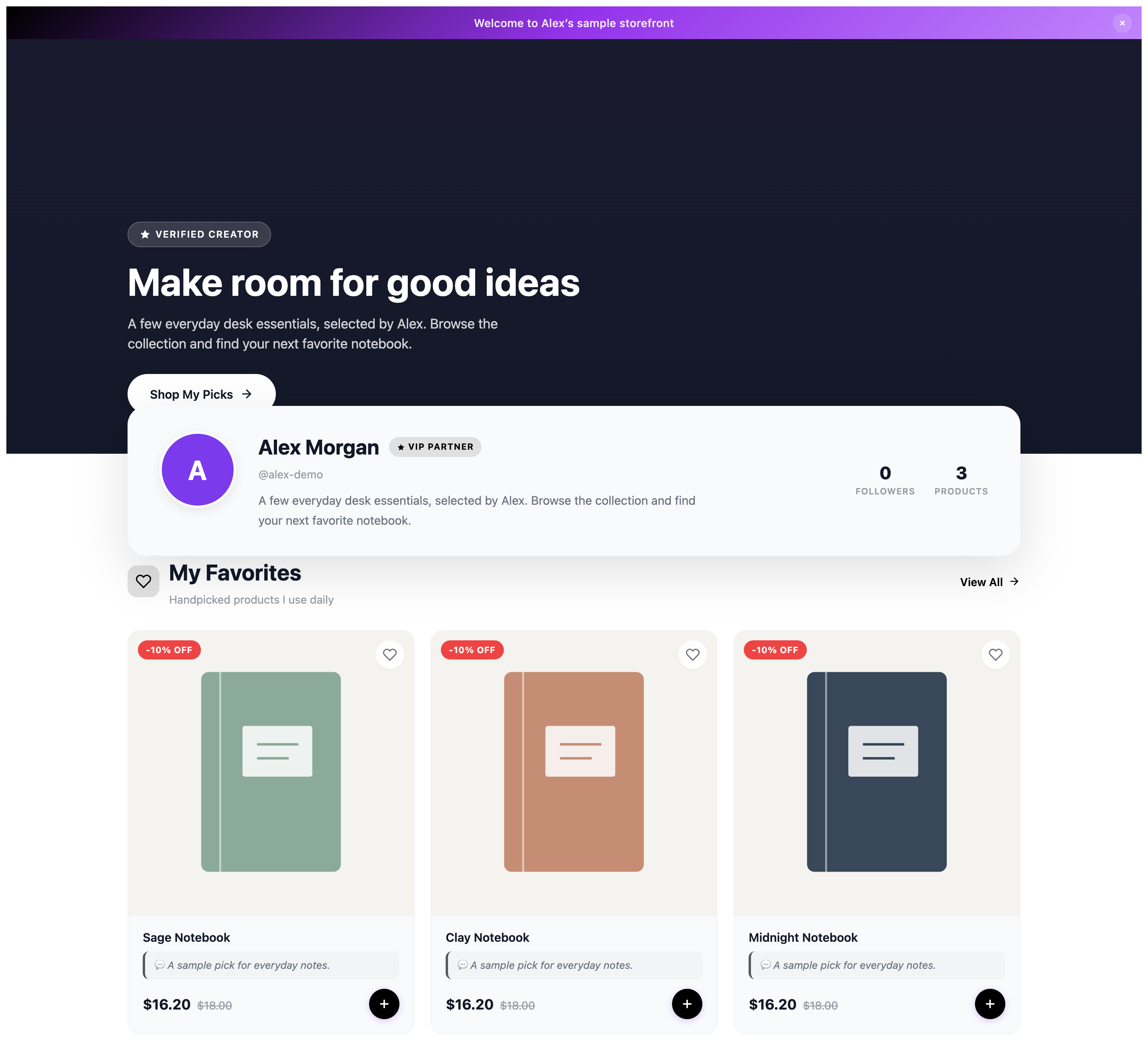
View full-size image: Shopper-facing VIP storefront
A storefront is a personalized commerce layer for a partner. It is delivered through the merchant store's configured app-proxy path and uses the partner's slug. It does not replace the merchant's Shopify online store, checkout, catalog, inventory, or order system.
The storefront can contain:
- Partner headline, biography, photo, hero image, and hero video
- Welcome and post-purchase thank-you messages
- Configurable content sections and responsive layout
- Products selected from the current merchant store
- Partner notes about featured products
- Curated bundles built from the current storefront product selection
- Public, password-protected, or token-based access
- Visible or hidden discount presentation
- All-product, featured-product, or category-based discount scope where enabled
- Page title and meta description for search presentation
- Seasonal styling and merchant-approved brand content where available
Draft, protected, and public are different states
| State | Meaning |
|---|---|
| Provisioned | A storefront record exists, usually after Tier 2 approval or promotion. It may still need content and products. |
| Draft | Work is saved but the storefront is not currently published. |
| Published and public | Anyone with the storefront URL can open it. |
| Published and password-protected | A visitor must enter the configured password. |
| Published and token-protected | A visitor needs a valid protected-link token. |
Creating the storefront does not publish it. The VIP partner or merchant should add content and products, check access and discount settings, preview all device sizes, and then publish when the experience is ready.
From storefront visit to commission
Shopper opens a VIP partner storefront
                  ↓
The storefront shows that partner's content and store-scoped products
                  ↓
The shopper opens a product or adds an eligible item to cart
                  ↓
Partner and store attribution context travels through the shopping journey
                  ↓
Shopify completes the order
                  ↓
Affilyn records the attributed order and calculates commission
                  ↓
Merchant and partner review performance in their respective dashboards
A storefront makes discovery and recommendation more personal, but the same commercial safeguards still apply: attribution rules determine credit, commission rules determine earnings, Shopify remains the order authority, and payout rules determine when funds become available.
How someone becomes Tier 1 or Tier 2
A merchant can create a partner directly, invite an existing verified partner, or approve a public application. The store relationship receives a tier during that process.
Application intake can use a configured score based on signals such as invitation source, verified social following, content type, engagement, and merchant tags. If signals require review or are unavailable, the intake logic can force the safer Tier 1 result for merchant review.
After onboarding, tier movement can follow one of three modes:
| Promotion mode | Behavior |
|---|---|
| Manual Only | No automatic evaluation runs; the merchant changes the partner's tier. |
| Recommend & Approve | Qualifying Tier 1 partners are recommended, but a merchant approves the promotion. |
| Auto-Promote | An unlocked Tier 1 partner who meets every enabled threshold is promoted automatically. |
Configured evaluation thresholds can include revenue, order count, conversion rate, follower count, and a 30-, 60-, or 90-day evaluation window. A threshold set to zero does not block qualification. Nonzero thresholds must all pass.
What promotion changes
When a Tier 1 partner becomes Tier 2:
- The store relationship changes to Tier 2 and the tier event is recorded.
- Tier 2 onboarding is made available to the partner.
- A storefront is created if the partner does not already have one.
- Enabled Tier 2 navigation and API access become available after all access gates pass.
- A promotion message can be sent.
- Welcome gifting can be triggered when auto-seeding is enabled and configured.
Promotion does not automatically finish storefront content, select products, publish bundles, or make the storefront public.
Tier locking, retention, and demotion
- Tier lock prevents automated tier movement for that store relationship. A merchant can use it to preserve an intentional tier assignment.
- Unlocked Tier 2 relationships can be evaluated for retention when automated evaluation is active.
- The current retention check uses half of the configured minimum revenue threshold. Repeated failures can create a demotion-review flag for the merchant.
- A flag is a review signal, not an automatic deletion of the partner's work.
- The merchant can review the partner, demote, lock the tier, or dismiss the flag.
When a partner is demoted from Tier 2 to Tier 1, VIP editing and upload access is reduced. If the partner has no other active Tier 2 store relationship, the storefront is unpublished to draft and published bundles return to draft. Content is preserved rather than deleted. If another active store still grants Tier 2, the shared storefront record is not globally drafted.
Multi-store example
Suppose Maya works with two merchants:
| Active store | Relationship | What Maya sees |
|---|---|---|
| Northwind Skin | Tier 1 Standard Affiliate | Northwind links, commissions, payouts, contracts, and Tier 1 progress. No Northwind storefront builder unless the merchant explicitly enables that feature for Tier 1. |
| Contoso Active | Tier 2 VIP Partner | Standard tools plus the Contoso-enabled storefront, bundle, analytics, discount, rights, asset, and gifting tools allowed by its subscription. |
Maya has one partner login, but the store switcher changes her working context. A link created for Northwind should not be treated as a Contoso link, and Contoso VIP access does not automatically make Maya VIP in Northwind.
Merchant example
A merchant might use this progression:
- Approve new applicants as Tier 1 so they can begin with tracked links.
- Set Tier 1 commission to 10% and Tier 2 commission to 20%.
- Evaluate performance over 90 days using revenue, orders, conversion, and follower thresholds.
- Use Recommend & Approve so the merchant reviews brand fit before promotion.
- Promote a qualifying partner to Tier 2.
- Review the newly provisioned storefront with the partner.
- Add products, content, access rules, discounts, and SEO.
- Preview the shopper experience and publish it for the campaign.
Common misunderstandings
| Misunderstanding | Correct concept |
|---|---|
| “A storefront is Tier 3.” | No. The storefront is a Tier 2 capability and shopper experience, not another tier. |
| “VIP means every premium feature is available.” | Tier mapping and merchant subscription access must also allow each feature. |
| “A partner has one tier everywhere.” | Tier belongs to the store relationship; one partner can have different tiers in different stores. |
| “Promotion publishes the storefront.” | Promotion provisions access and a storefront record; content preparation and publication are separate. |
| “Tier 1 cannot earn without a storefront.” | Tier 1 is designed to earn through tracked links and attributed orders. |
| “Demotion deletes the storefront.” | Content is preserved. The storefront and published bundles move to draft when no other active Tier 2 relationship remains. |
| “The storefront replaces Shopify checkout.” | Shopify remains responsible for the catalog, cart, checkout, and order. |
| “Tier commission is always the final rate.” | Partner overrides, campaign rates, commission basis, attribution, refunds, and other rules can affect the result. |
Where to go next
- Merchants: configure names, commissions, feature mapping, promotion mode, and thresholds in Tier Configuration.
- Standard Affiliates: begin with the Standard Affiliate guide.
- VIP Partners: continue with VIP onboarding and Storefront content and layout.
- Multi-store partners: read Store affiliations and tier access.
- Merchants and shoppers: review the Public storefront experience.
Current behavior
- Tier is resolved for the active store affiliation, so the same partner can be Tier 1 for one store and Tier 2 for another.
- Tier feature mapping and merchant subscription access are enforced in addition to the tier label.
- Tier 2 approval or promotion provisions a storefront when the partner does not already have one.
Limitations
- Merchants can rename Tier 1 and Tier 2, so labels may differ even though the underlying tier numbers remain the same.
- A provisioned storefront is not automatically a complete or published storefront.
- Demotion does not delete storefront content; when no other active Tier 2 affiliation remains, the storefront and published bundles are moved back to draft.