
Payout settings and history
Configure and confirm PayPal or Stripe destinations, select a preferred method, request eligible commissions, and track payout confirmation.
Before you start
- Have an active affiliation with the selected store.
- The merchant must enable the intended payout method.
Where to find it
Partner dashboard → select store → Payout Settings
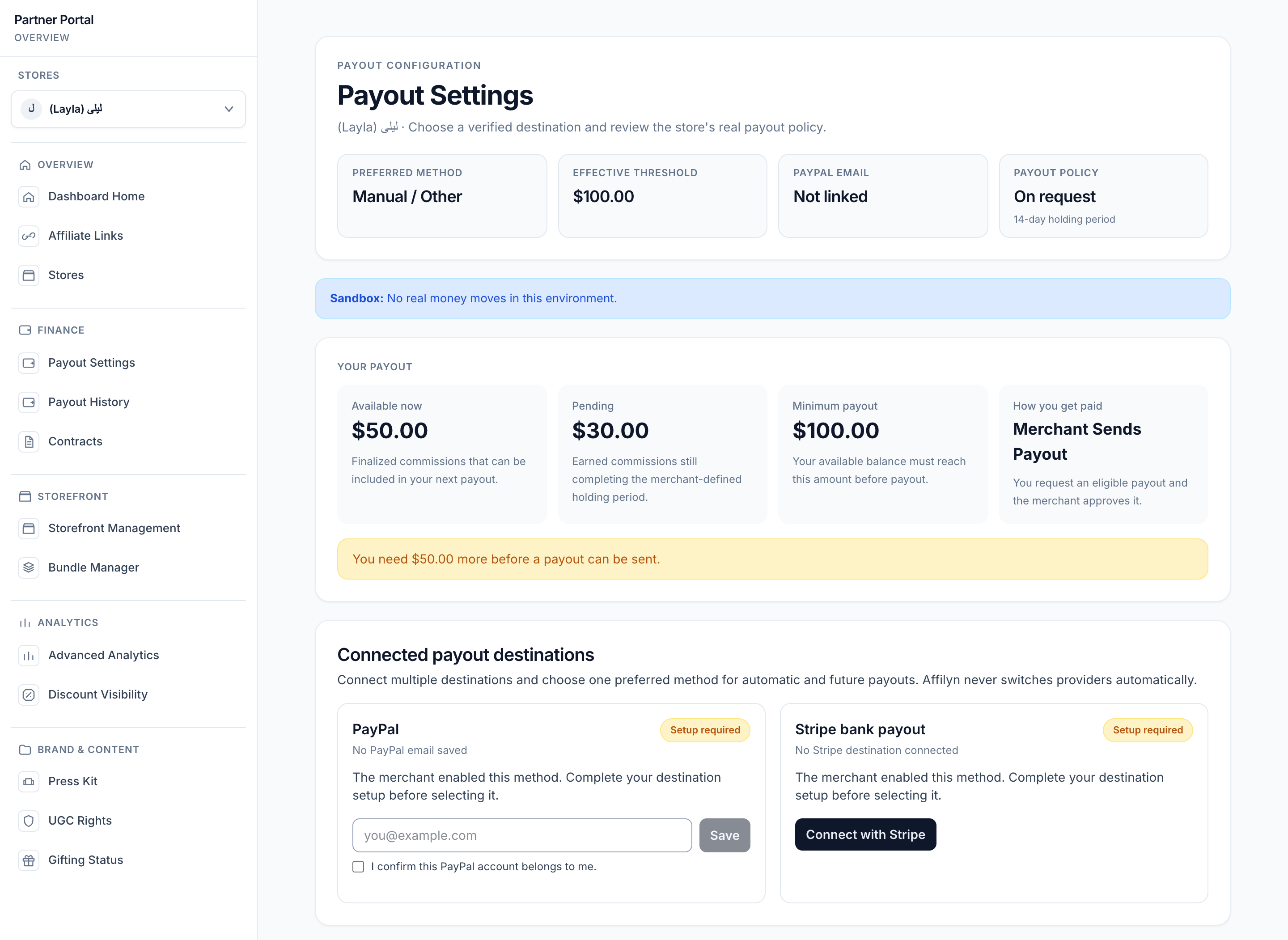
View full-size image: Partner payout settings and balance
Always select the correct store before changing payout settings. Provider availability, destination records, currency, policy, request history, and payout history are store-specific.
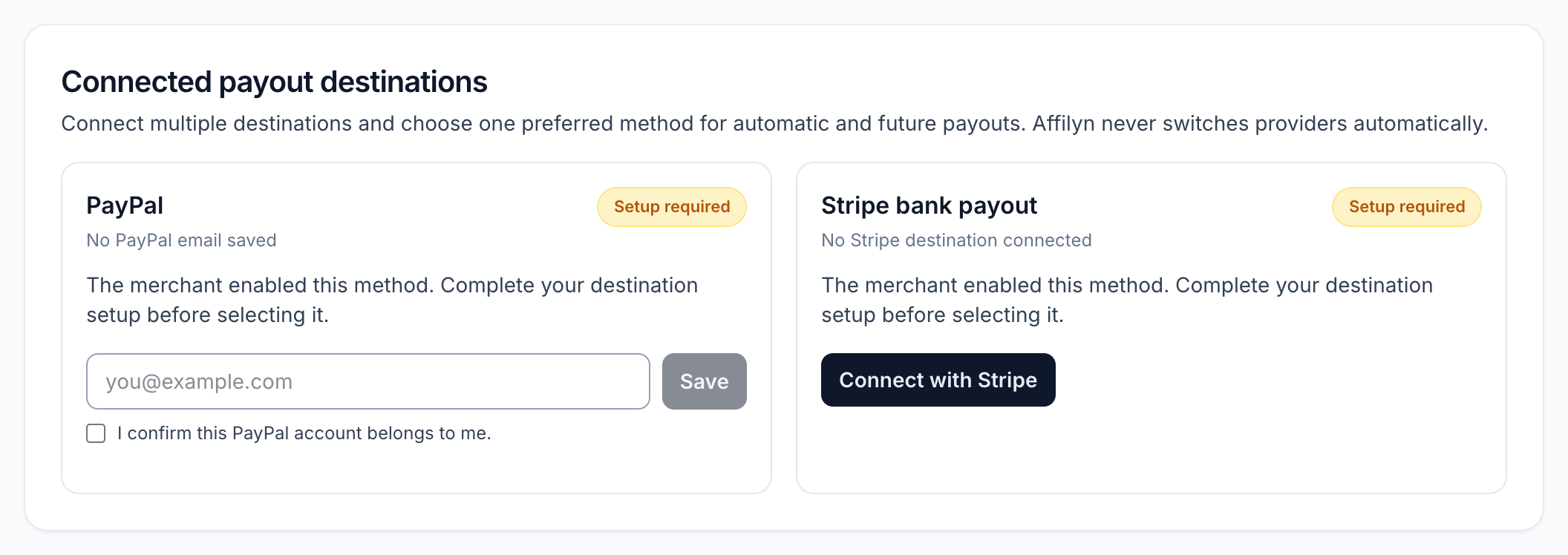
View full-size image: Partner destination controls
Configure PayPal
- Confirm the merchant shows PayPal as available for this store.
- Choose Save/Connect PayPal and enter the email belonging to your PayPal account.
- Confirm the ownership checkbox.
- Affilyn stores an encrypted destination and marks it
pending_confirmation. - Open the confirmation email sent to your Affilyn partner email address.
- Choose Confirm PayPal email within 24 hours.
- Return to Payout Settings and verify the destination shows Confirmed.
- Choose PayPal as Preferred if future requests and scheduled payouts should use it.
Saving the email is not confirmation. The email confirmation link is one-time, expires after 24 hours, and proves control of the partner profile email flow; it does not replace PayPal's own account rules. If the link expires, save the destination again to request a new confirmation.
Configure Stripe
- Confirm Stripe is available for the selected store.
- Choose Connect with Stripe.
- Complete identity, business, and bank-destination steps on Stripe-hosted pages.
- Return to Affilyn and refresh until the destination is verified.
- Mark Stripe Preferred when it should be used for future payouts.
Affilyn does not collect raw Stripe bank details.
Preferred destination
Exactly one confirmed/verified destination can be preferred for a shop. The first confirmed destination may become preferred automatically when no other preferred destination exists. You may change it later.
- Automatic payouts use only the preferred destination.
- Affilyn never switches from PayPal to Stripe, or Stripe to PayPal, automatically.
- Existing requests/payouts retain the provider and masked destination selected when created.
- Replacing/disconnecting is blocked while commissions are reserved or processing.
Balances and threshold
| Item | Meaning |
|---|---|
| Pending | Commission is not finalized or has not passed the holding period. |
| Available now | Finalized, matured, unreserved commission eligible for payout. |
| Reserved | Commission is locked to an active request or payout. |
| Minimum payout | Store default or partner override required before payout creation. |
| Maximum payout | Optional store cap; only whole eligible commission rows are selected. |
| Next automatic payout | Next weekly/monthly UTC run when configured by the merchant. |
The current minimum override is stored on the creator profile and applies across store contexts. Choose Use Shop Default to remove the override.
Request payout
The button becomes available only when:
- An automated provider is enabled and operational for the selected store.
- Your destination is confirmed/verified and selected for the request.
- Currency and policy rules pass.
- Available balance meets the effective minimum.
- The merchant allows on-request/early requests.
- No request or payout is already pending, under review, approved, queued, or processing.
On submission, Affilyn recalculates eligibility on the server and reserves the exact commissions. Wait for merchant review when required. You may cancel while the request is pending or under review; cancellation releases the reservation.
Automatic payouts
For a weekly or monthly policy, Affilyn checks your preferred destination at the scheduled UTC time. If it is unavailable, unconfirmed, below threshold, wrong currency, or already involved in a payout, you are skipped safely. Affilyn does not use another provider without your selection.
Manual payouts
When the merchant uses Manual / Other, money is sent outside Affilyn. The merchant then records amount, method, external reference, notes, and optional proof URL. A manual record documents the payment; it is not an instruction for Affilyn to send money. Ask the merchant for the external reference if you need to reconcile the payment.
Status and confirmation
| Status | Meaning |
|---|---|
| pending / under review | Merchant has not decided; commissions remain reserved. |
| approved / queued | Execution is authorized but not yet confirmed by the provider. |
| processing | Provider accepted the operation; do not request again. |
| unclaimed | PayPal has not been claimed by the recipient. |
| paid | Provider success was verified and history is final. |
| rejected / cancelled | Request ended before payment and reservation is released. |
| failed | Provider reported definitive failure. |
| reversed / returned | Provider returned funds and balances require correction. |
| outcome unknown | Affilyn is reconciling; do not ask for a duplicate payment. |
Approval is not proof of payment. Treat the payout as complete only when
history shows paid after provider webhook or authoritative reconciliation.
Troubleshooting
- PayPal unavailable: ask the merchant to connect PayPal, validate Payouts access/webhook, and enable it.
- PayPal pending confirmation: open the latest confirmation email; expired or consumed links cannot be reused.
- Cannot make PayPal preferred: confirmation has not completed for this store.
- Request disabled: read the displayed reason and check destination, threshold, holding period, currency, store policy, and active requests.
- Payout remains processing: wait for provider confirmation; do not submit another request.