Standard AffiliateVIP PartnerGuide
Affiliate Links
Search products, copy tracked links, export link data, and sync the product list when the catalog needs updating.
Last reviewed: Jul 28, 2026UI path: Partner dashboard → Affiliate Links
When to use this page
- You are preparing a campaign and need tracked links for products in the active store.
- You need to export the current catalog view or refresh missing products before sharing links.
Before you start
- Have at least one active store affiliation.
Success looks like
- The active store is correct before you copy or export links.
- The tracked links you need are copied or exported successfully.
- You know whether a missing item needs product sync or a merchant catalog update.
Where to find it
Partner dashboard → Affiliate Links
Steps
ScreenshotSteps 1-4
Local image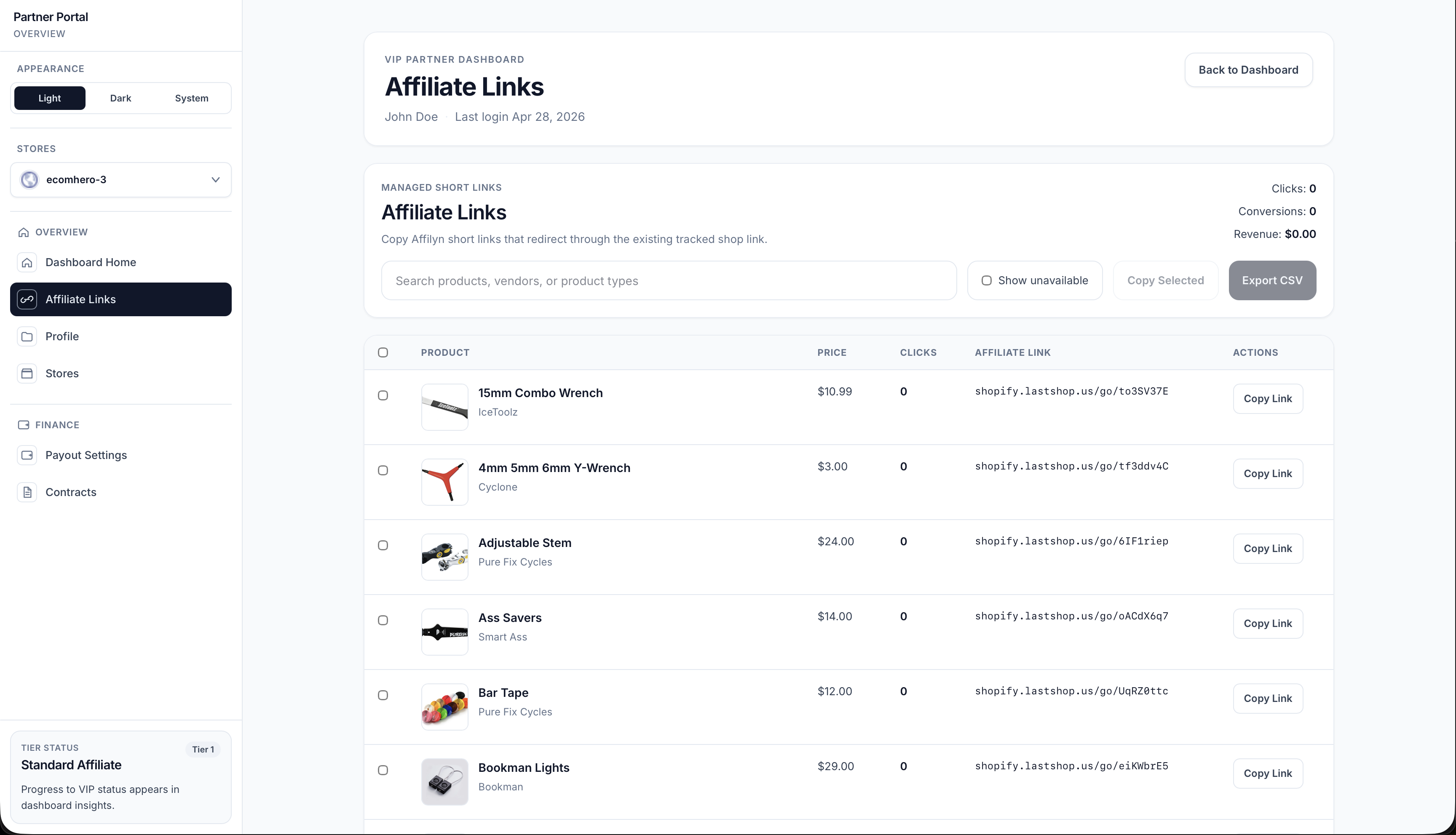
- Open Affiliate Links.
- Search for the product or collection you want to promote.
- Copy the tracked link for the product you want to share.
- Export the list if you need link data outside the dashboard.
- Use the sync option if the product list looks incomplete or outdated.
Settings explained
- Search helps you find the right product quickly.
- Copy gives you the tracked link for that product.
- Export is useful when you want to review or save link data in bulk.
- Sync Products refreshes the product list when the catalog has changed.
Example
A partner prepares a new promotion by searching for fresh products, copying the tracked links for three items, and exporting the list to keep a simple campaign record outside the dashboard.
Tips and limits
- Check the active store before copying links if you work with more than one brand.
- If the product list looks incomplete, try sync before assuming the product is unavailable.
- Keep campaign notes outside the dashboard if you need to compare link sets later.
Current behavior
- The links page generates tracking from the currently selected store context and the available product data for that store.
Limitations
- Missing or stale products often require a sync or an upstream catalog update before they appear.
- Copying links from the wrong store gives the wrong tracking context for that campaign.