
Subscription plans and billing
Understand Affilyn's permanent free entitlement, additive paid capacity, annual discounts, 14-day trial, and safe subscription transitions.
When to use this page
- You need to choose, upgrade, downgrade, reactivate, or cancel an Affilyn plan.
- You need to understand partner capacity, the free VIP slot, annual pricing, or trial eligibility.
Before you start
- Install Affilyn in your Shopify store.
- Open the app with a merchant account that can approve Shopify app charges.
Success looks like
- You can distinguish permanent free capacity from paid-plan capacity.
- You understand annual billing, the one-time trial, Shopify approval, and safe downgrade behavior.
Where to find it
Shopify admin → Apps → Affilyn → Plans & billing
Every merchant has a permanent base entitlement. A paid subscription adds capacity and features on top of that base; it does not replace the free entitlement.
Permanent Free Plan
The Free Plan includes:
- 5 active partners total
- 4 Standard Affiliate slots
- 1 merchant-designated VIP Affiliate slot with storefront access
- Unlimited synced products and product affiliate links
The free VIP designation is separate from the partner's historical tier. The merchant controls which eligible active affiliation uses the free VIP/storefront slot and can transfer it to another eligible affiliation. Only one affiliation per shop can hold the free VIP designation at a time.
Transferring the designation preserves both partners' relationship, commission, analytics, storefront, and tier-history records. Storefront data is retained when access is removed, but it cannot be published or accessed unless the partner is covered by the free VIP slot or available paid storefront capacity.
Plans and prices
Paid subscriptions are available monthly or yearly. Yearly billing is one annual Shopify charge and displays both total savings and the effective monthly price.
| Plan | Monthly | Yearly | Annual discount | Annual saving | Effective monthly |
|---|---|---|---|---|---|
| Free | $0 | $0 | — | — | $0 |
| Starter | $29 every 30 days | $330.60/year | 5% | $17.40 | $27.55 |
| Growth | $79 every 30 days | $853.20/year | 10% | $94.80 | $71.10 |
| Professional | $199 every 30 days | $2,029.80/year | 15% | $358.20 | $169.15 |
| Enterprise | $499 every 30 days | $4,790.40/year | 20% | $1,197.60 | $399.20 |
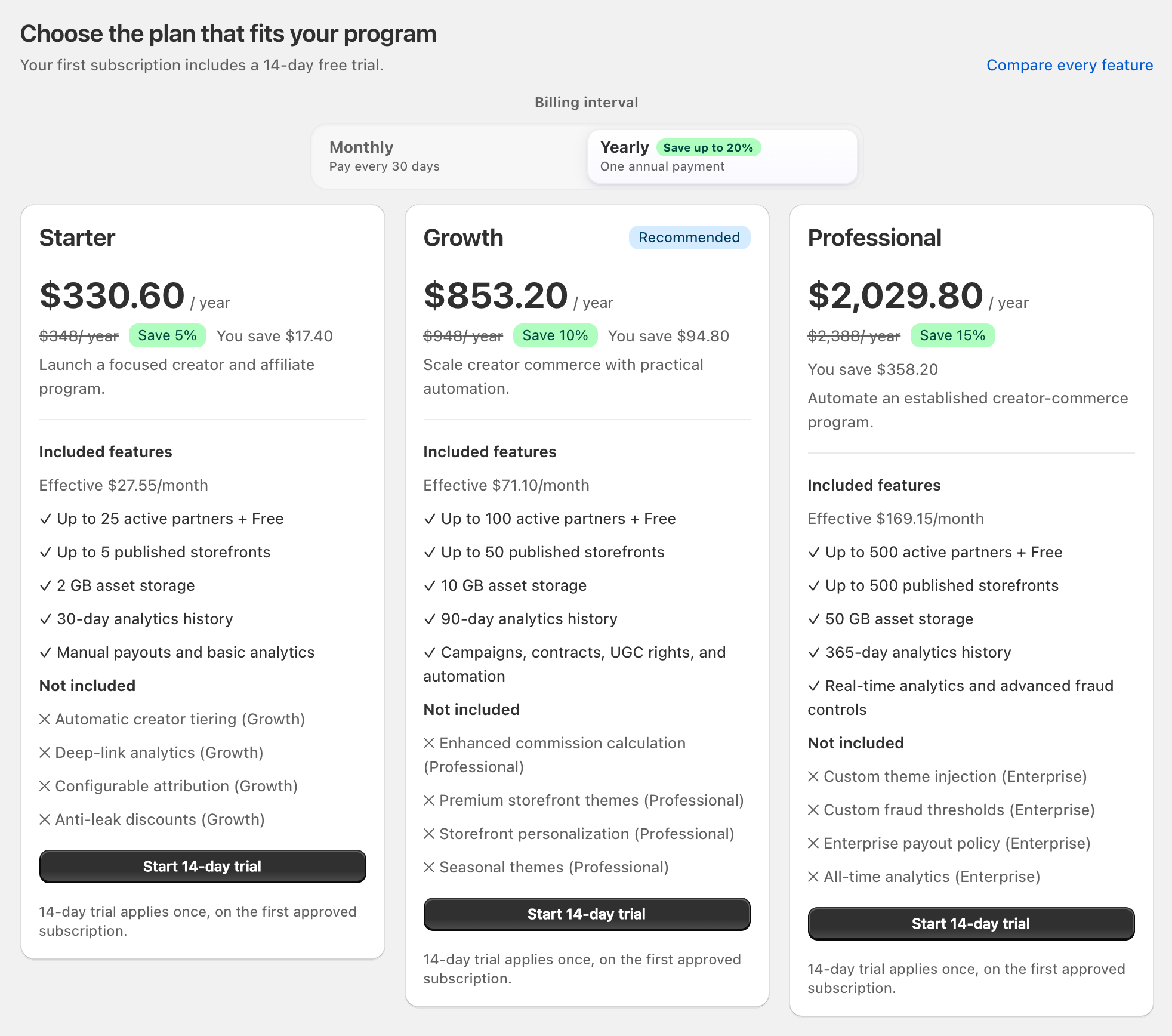
View full-size image: Compare yearly offers
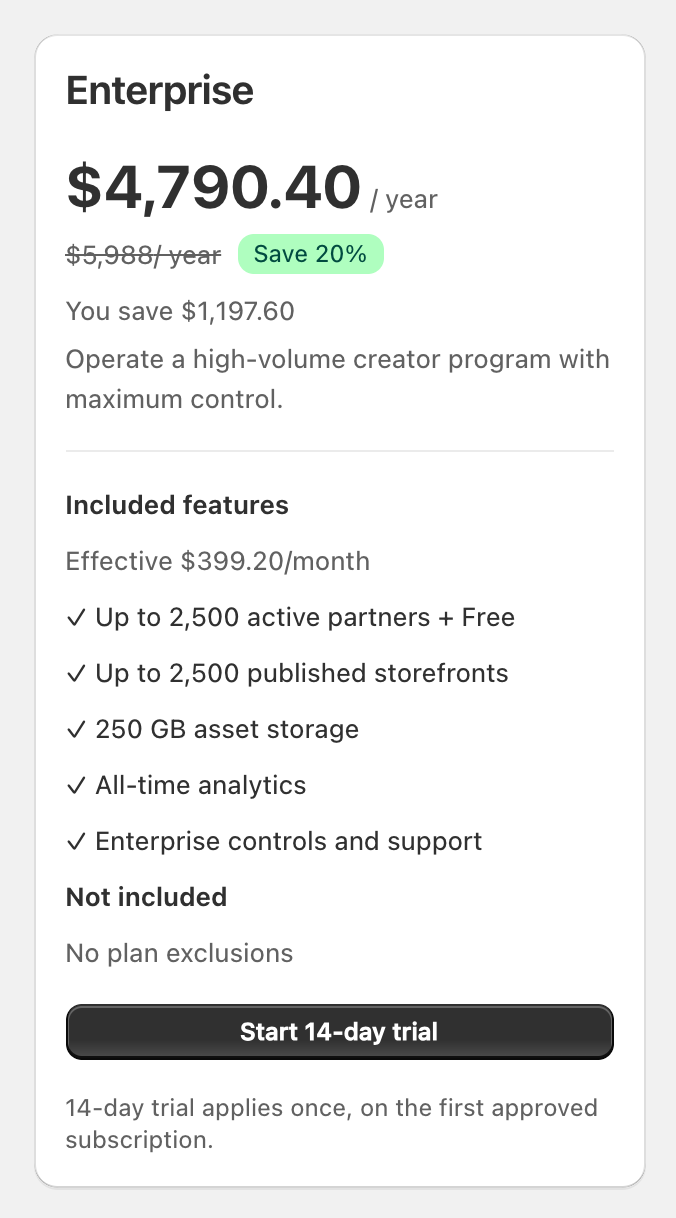
View full-size image: Enterprise yearly offer
The effective monthly figure uses the monthly offer’s recurring amount, or one twelfth of a yearly offer rounded to the nearest displayed minor unit. The screenshots above illustrate yearly offers; they do not demonstrate Shopify approval or an actual charge. Always check the recurring amount and billing interval on Shopify’s approval screen.
Existing annual subscriptions retain their already-approved Shopify charge until the merchant changes plan or billing interval. The current catalog price applies when Shopify approves a replacement subscription.
Additive partner capacity
The partner allowance shown for a paid package is added to the permanent five free slots.
Combined active capacity = 5 free partners + paid package partner limit
| Plan | Permanent free | Paid add-on | Combined active partners | Combined published storefront capacity |
|---|---|---|---|---|
| Free | 5 | 0 | 5 | 1 |
| Starter | 5 | 25 | 30 | 6 |
| Growth | 5 | 100 | 105 | 51 |
| Professional | 5 | 500 | 505 | 501 |
| Enterprise | 5 | 2,500 | 2,505 | 2,501 |
Starter therefore supports 30 active partners: up to 24 Standard Affiliates and up to 6 VIP/storefront affiliations when all capacity is used. The permanent base portion always remains four Standard plus one designated free VIP.
Other paid limits remain package-specific:
| Limit | Starter paid entitlement | Growth paid entitlement | Professional paid entitlement | Enterprise paid entitlement |
|---|---|---|---|---|
| Asset storage | 2 GB | 10 GB | 50 GB | 250 GB |
| Email sends per cycle | 0 | 5,000 | 25,000 | 100,000 |
| Scheduled campaigns | 0 | 10 | 50 | 250 |
| Contracts per cycle | 0 | 10 | 250 | 1,000 |
| Gift orders per cycle | 0 | 25 | 250 | 2,000 |
| Analytics history | 30 days | 90 days | 365 days | All time |
| Automated payout providers | 0 | 1 | 2 | 2 |
| Marketing integrations | 0 | 1 | 2 | 2 |
In Plans & billing, the Current usage cards show measured usage against the displayed package limits. The section explains that paid limits are added to the permanent Free allowance; it does not display separate base, paid and combined columns. Use the combined-capacity table above to interpret that allowance.
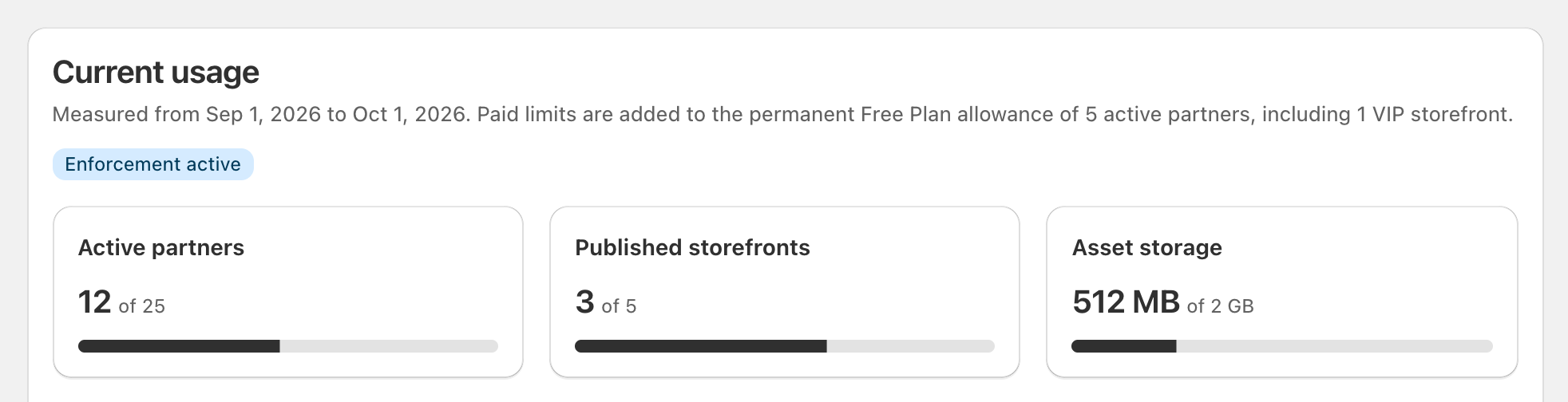
View full-size image: Read current usage with the Free allowance
Feature access
Starter
- Core creator-commerce platform
- Applications, partner management, affiliate links, attribution, orders, and commissions
- Basic storefronts, asset library, analytics, and manual payouts
Growth
Includes Starter, plus automatic tiering, deep-link analytics, configurable attribution, anti-leak discounts, full storefront tools, email campaigns, UGC rights, gifting, contracts, one marketing integration, and one automated payout provider.
Professional
Includes Growth, plus enhanced commission calculation, premium storefront themes, personalization, marketing pixels, premium press kits, automatic seeding, both marketing integrations, both automated payout providers, real-time analytics, and advanced fraud controls.
Enterprise
Includes Professional, plus custom themes, custom fraud thresholds, enterprise payout policy, all-time analytics, and enterprise support.
One-time 14-day trial
An eligible merchant's first approved paid subscription receives a 14-day trial, whether the selected offer is monthly or yearly. Trial eligibility is first-use-only and does not reset after cancellation, reinstall, plan changes, or billing-interval changes.
At trial end:
- Shopify activates the approved paid subscription when billing continues.
- Without a paid subscription, Affilyn returns the shop to the Free Plan.
- The permanent five-partner base entitlement remains available.
Start, upgrade, or change billing interval
- Open Plans & billing.
- Review the displayed package usage, the combined-capacity table in this guide, and the feature comparison.
- Select Monthly or Yearly.
- Select the plan.
- Review the recurring charge, billing interval and charge timing. For Yearly, also review annual savings and the effective monthly price.
- Complete Shopify approval.
- Return to Affilyn and confirm the plan, interval, and combined capacity.
Only one plan change can be pending at a time. New paid capacity becomes available after Shopify confirms the subscription. Previously paused partners are not automatically reactivated; the merchant chooses which ones to reactivate within the new combined limit.
Cancellation, expiration, and downgrade
Paid access normally remains available through the approved billing period. Before a cancellation, expiration, or downgrade would reduce capacity, Affilyn warns the merchant and provides a partner-selection workflow.
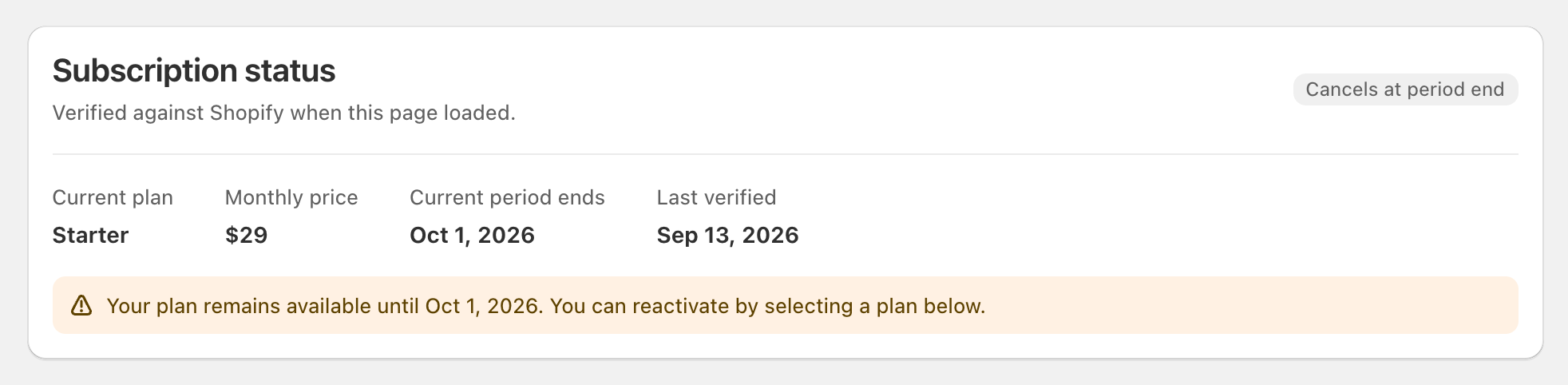
View full-size image: Cancellation at period end
When the shop will return to Free and has at least five active partners:
- Select exactly five unique active affiliations to retain.
- Designate exactly one of them as the free VIP/storefront affiliation.
- The other four retained affiliations use the Standard allowance.
- Revise the selection until the subscription end date.
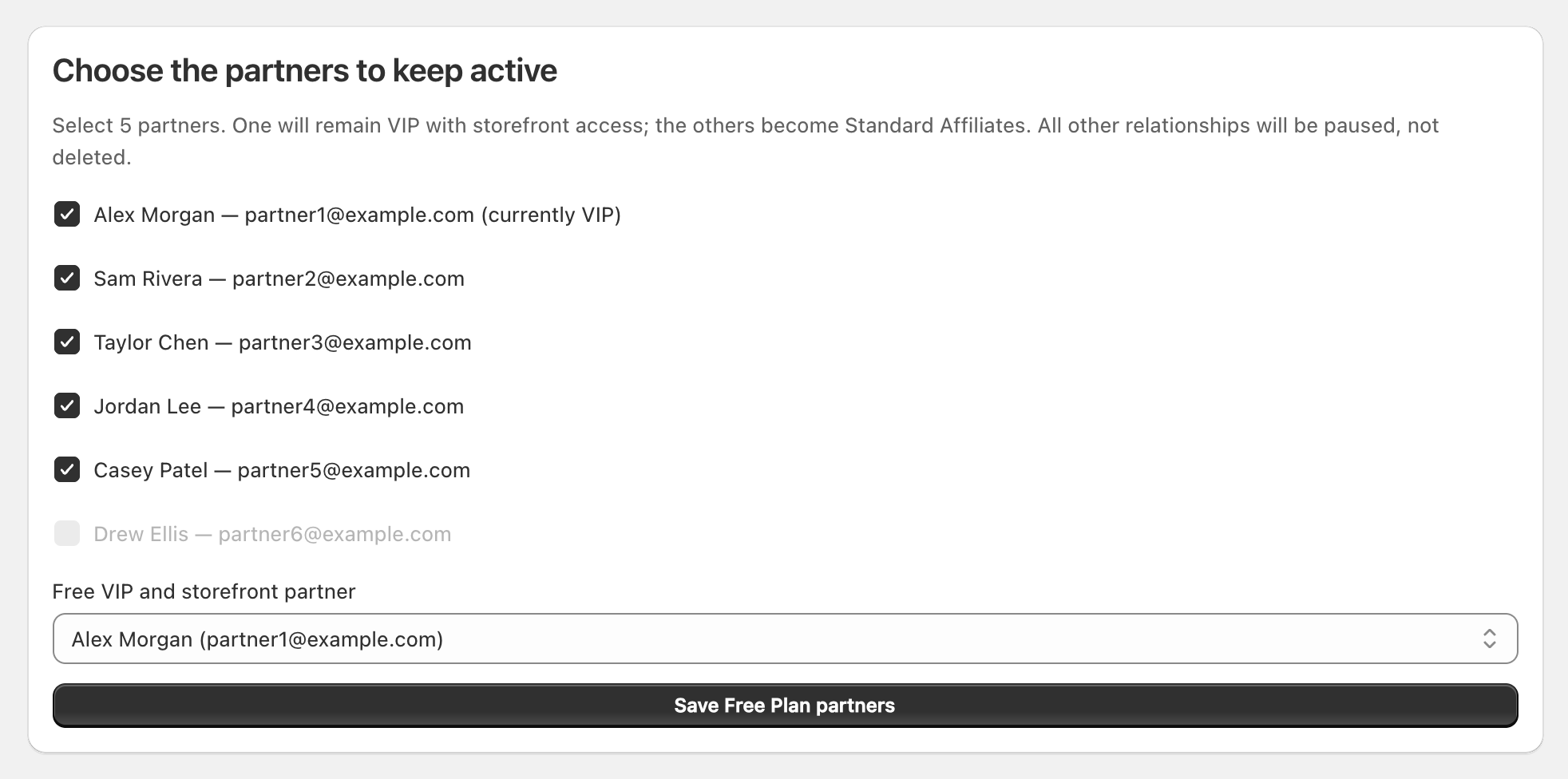
View full-size image: Choose the partners to retain on Free
At expiry, Affilyn applies the saved selection atomically. Excess affiliations are changed to Paused—never deleted. Their relationship records, commissions, orders, analytics, history, and storefront data remain intact.
If no valid selection exists, the deterministic fallback:
- Retains the currently designated free VIP when eligible; otherwise it uses the most recently active eligible VIP.
- Fills the other four slots using recent tracked engagement, then affiliation date and stable ID for ties.
- Pauses every excess affiliation.
- Treats retained non-designated VIPs as Standard for the Free Plan composition while preserving tier history.
After expiry, merchants can change the five active partners through the normal pause/reactivate controls and can transfer the free VIP designation. Combined capacity and concurrency checks still apply.
Data preservation and reactivation
Pausing never deletes business records. If the merchant later buys another paid plan, combined capacity increases immediately and paused affiliations can be reactivated explicitly. Affilyn does not reactivate every paused partner automatically because the merchant may want to control capacity and storefront access.
Troubleshooting
- Complete or decline an open Shopify approval before starting another billing action.
- If Shopify approval expires, start the action again from Plans & billing.
- If a paid feature is unavailable, confirm subscription status, catalog version, billing interval, and combined usage.
- If a downgrade selection is rejected, check for duplicates, cross-shop affiliations, archived partners, a stale subscription end date, or concurrent capacity changes.
- If billing status remains incorrect after refresh, contact Affilyn support with the Shopify charge reference.